Shopify Accessibility Checker: 2026 E-commerce Buying Guide
Could a few overlooked barriers make it harder for customers to use your Shopify store and leave you exposed to legal complaints? A shopify store…
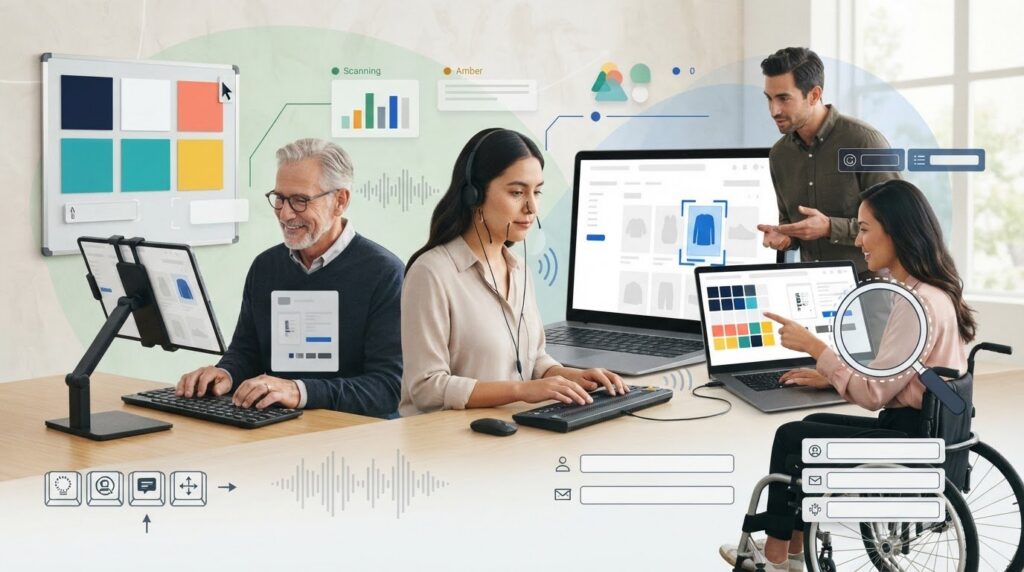
Could a few overlooked barriers make it harder for customers to use your Shopify store and leave you exposed to legal complaints? A shopify store accessibility checker can flag common issues across the pages it scans. But a scan is not legal clearance, and no automated tool catches every barrier.
If you’re unsure whether to follow WCAG 2.1 or 2.2, or worry that checking your theme means digging into code, you’re not alone. You need a clear starting point, not jargon or promises of guaranteed protection. This guide explains what a scanner can detect, where its limits are, and how to use its results to prioritize what to review.
You’ll learn what to look for in an accessibility checker, how Shopify themes and installed apps can affect scan results, and why WCAG 2.2 is an important benchmark even when some frameworks still reference WCAG 2.1. You’ll also see how a free automated scan can support an initial risk-triage process, while making clear what needs further evaluation.
Key Takeaways
- Use a shopify store accessibility checker to surface common barriers and build a prioritized review list.
- Compare tools by the WCAG criteria they cover and whether they can assess dynamic elements such as carts, pop-ups, and app content.
- Understand what automated scans can flag and what they may miss.
- Check theme components and third-party apps for problems that could affect shopping tasks.
- Use a free automated scan as an initial triage step, then decide what to investigate next.
Why Your Shopify Store Needs a Dedicated Accessibility Checker
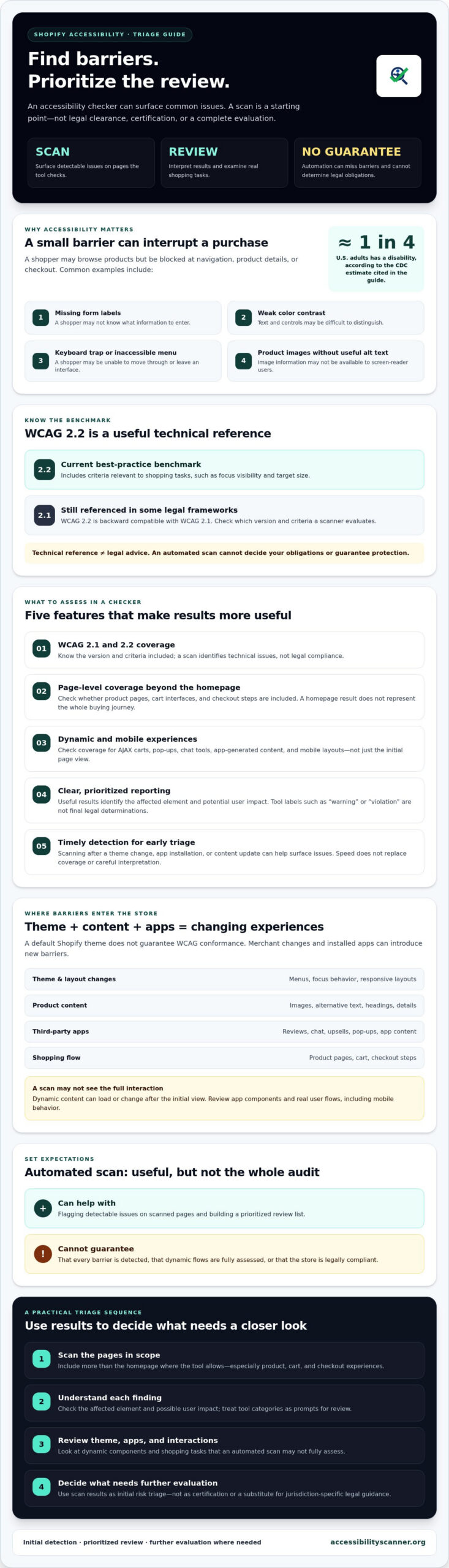
Could a customer browse your products but fail to complete checkout? A missing form label, weak color contrast, or keyboard trap can turn a routine purchase into a barrier. Accessibility problems can also create operational and legal exposure. ADA Title III litigation has targeted e-commerce businesses, and a Shopify store’s size doesn’t guarantee it will avoid a complaint.
Shopify provides themes and storefront tools, but a default theme doesn’t guarantee WCAG conformance. Merchants change layouts, add product content, and install apps for reviews, chat, or upsells. Each change can introduce barriers. A product image without useful alternative text or a menu that can’t be operated by keyboard may prevent shoppers from finding or buying an item.
The Legal Reality for Shopify Merchants
The ADA is a U.S. civil rights law, and Title III applies to businesses considered places of public accommodation. How its requirements apply to websites can depend on legal context, so an automated scan can’t determine your obligations or guarantee protection. Demand letters can reach brands of different sizes, so don’t assume a smaller operation is outside the risk. Web accessibility means designing digital content so people with disabilities can perceive, navigate, and interact with it.
For technical planning, WCAG 2.2 is the current best-practice benchmark. Some legal frameworks still refer to WCAG 2.1, while WCAG 2.2 adds criteria relevant to shopping tasks, including focus visibility and target size. It is backward compatible with WCAG 2.1. Use the version your evaluation covers as a technical reference, not as a substitute for jurisdiction-specific legal guidance.
Revenue and Brand Reputation
Accessibility affects more than a narrow group of shoppers. The CDC estimates that about one in four U.S. adults has a disability. If navigation, product details, or checkout create barriers, some customers may be unable to complete a purchase. Clear labels, readable contrast, and predictable controls can also make shopping easier for customers using phones, dealing with temporary limitations, or navigating a busy screen.
Accessible structure can support discoverability, too. Descriptive headings organize product information, while meaningful alt text communicates image content to people using screen readers and gives search engines context. These practices don’t guarantee higher rankings, but they can make information clearer for visitors and search tools.
A shopify store accessibility checker is an early warning tool. It can flag detectable issues across scanned pages and help you decide what to review first. AccessibilityScanner.org offers a free automated WCAG and ADA scanner for initial detection. Treat its results as triage, not certification. Automated tools can miss barriers, including problems in dynamic content or real user flows.
5 Critical Features of a Shopify ADA Compliance Checker
A long scan report isn’t useful if it leaves you guessing what to address first. Choose a checker that helps you spot likely barriers, understand their context, and decide what to review. These five features can help you assess a tool for Shopify accessibility triage.
- WCAG 2.1 and 2.2 coverage. Check which version and criteria a tool evaluates. WCAG 2.2 is the current best-practice benchmark, while some legal frameworks still reference WCAG 2.1. The U.S. Department of Justice explains its position on websites in Guidance on Web Accessibility and the ADA. A scan can identify technical issues, but it can’t determine your legal obligations or certify compliance.
- Page-level scanning beyond the homepage. Product pages, cart interfaces, and checkout steps are central to shopping. Confirm which pages the checker scans. A homepage result does not represent the full buying journey.
- Coverage for dynamic and mobile experiences. AJAX carts, pop-ups, chat tools, and app-generated content may load or change after the initial page view. Check whether a tool can evaluate these elements rather than assuming Shopify-specific dynamic content is covered. Also test mobile layouts, where small controls, overlays, and focus behavior can create distinct barriers.
- Clear, prioritized reporting. Useful results explain the affected element and potential user impact. Missing image text may leave a shopper without product details; a keyboard trap can prevent someone from moving through or leaving a dialog. Treat labels such as “warning” and “violation” as the tool’s categories, not a final legal determination. Check what each result means before setting priorities.
- Fast detection for early triage. Timely scans can help you notice issues after a theme change, app installation, or content update. Speed matters, but it doesn’t replace coverage or careful interpretation.
Turn Results Into a Practical Triage List
Start with barriers that could interrupt essential tasks: navigating menus, selecting product options, adding items to a cart, and completing forms. Then review issues that make content difficult to perceive or understand, such as missing alt text or unclear form labels. Record the page and element for each finding, then check whether it also affects other templates or app components. This creates a practical work queue without treating every flag as equally urgent.
A shopify store accessibility checker is an early-warning tool, not a complete assessment. Automated results can miss problems in interactive flows, and a clean report doesn’t prove that every customer can use the store. AccessibilityScanner.org provides a free automated WCAG and ADA scanner to help identify barriers as an initial step. Use its results to guide further review, not as a guarantee or legal advice.
For a first-pass scan, try the free automated accessibility scanner. Before relying on any tool to assess carts, pop-ups, or apps, verify what it can and can’t scan.
Automated vs. Manual Audits: Managing Expectations
A scan can surface problems quickly, but it can’t tell you whether every shopper can complete a purchase. Use automated testing to detect common, machine-checkable barriers, then investigate interactions and context a tool can’t reliably judge. A clean report is not proof of full accessibility, and an issue list is not a legal opinion.
What Automated Scanners Do Well
A shopify store accessibility checker can flag issues such as insufficient color contrast, missing form labels, and images without alt-text attributes. These findings provide a practical starting list. If the scanner supports multiple URLs, it can also help you check product-page templates at scale rather than reviewing only the homepage.
Automation is useful for repeat checks. Run scans after changing a theme, adding an app, or publishing new content to catch detectable regressions. Free tools make an initial review accessible, while paid tools may differ in page coverage, reporting detail, or workflow features. Compare what each tool actually scans and reports. A higher price or compliance score doesn’t establish that a store is fully accessible.
Be cautious with the “30–40% rule.” There is no universal percentage that reliably describes how many accessibility problems automation will catch. Coverage depends on the tool, the pages tested, and the barriers present. The W3C’s Introduction to Web Accessibility explains the broader goal: people with disabilities should be able to perceive, understand, navigate, and interact with websites. A scanner can check some technical signals, but it can’t judge every user experience.
Where Human Testing Adds Context
Some failures only become clear during interaction. A screen reader user might hear a confusing sequence of product options or encounter a dialog that announces the wrong information. Keyboard testing can reveal whether focus moves in a logical order and whether a shopper can enter and exit a menu, cart, or pop-up. These checks matter when custom Shopify Liquid code or third-party apps change how a page behaves.
Use scan results as triage, not as a finish line:
- Start with purchase blockers. Investigate keyboard traps, unusable controls, and form errors that could interrupt browsing or checkout.
- Check context-sensitive findings. A scanner can detect an alt-text attribute, but it can’t reliably determine whether the text describes the product usefully.
- Verify warnings. Review each flagged element in context. Warnings and violations are tool labels, not universal legal classifications.
Move beyond scanning when results are unclear, key shopping flows rely on dynamic content, or you need confidence about screen-reader and keyboard interactions. AccessibilityScanner.org’s free automated WCAG and ADA scanner can help identify barriers as an initial step, but it doesn’t provide manual audits or code fixes. Start with a free automated accessibility scan, then use the findings to decide what needs closer evaluation.
Auditing Your Shopify Theme and Apps for Compliance Gaps
A fresh Shopify theme can still contain accessibility gaps. Theme-store review or a clean installation doesn’t confirm that every product template, menu, or interactive feature works for people using assistive technology. Customizations, content, and installed apps shape what shoppers encounter. Recheck after theme updates and app changes, not just at launch.
Identify High-Risk Shopify Elements
Focus on the parts of the store shoppers rely on to browse and buy. A quick-view modal may open without moving keyboard focus into it, or a shopper may be unable to close it and return to the page. A slide-out cart can hide controls from keyboard or screen-reader users. Test these elements on desktop and mobile, where limited screen space can change how menus, dialogs, and buttons behave.
- Product images: Review alt text across the catalog. A missing attribute or generic label may fail to convey useful product details. Sampling a few items can reveal a pattern, but it won’t confirm every listing.
- Forms: Check contact forms and checkout fields for visible labels that are programmatically associated with their controls. Placeholder text alone may not provide a dependable label.
- Interactive controls: Open quick views, cart drawers, menus, and pop-ups using a keyboard. Confirm that focus remains visible and that controls can be reached and dismissed.
A shopify store accessibility checker can flag detectable issues across the pages it scans. Use it after a theme update as an early check, then verify whether important interactive components were included. Don’t assume a tool can evaluate content that loads only after a click or another interaction.
Monitor App-Generated Barriers
Review apps for reviews, upsells, chat, and promotions as part of store maintenance. Their content may appear in overlays or load dynamically, so a scan of the initial page view might not capture it. A “set it and forget it” approach can miss changes: app updates, new settings, or altered content may affect customer interactions even when the theme stays the same.
App-injected code can increase ADA-related accessibility risk by adding controls or content that create barriers for shoppers with disabilities, even if the underlying theme has no detected issue.
After installing or updating an app, trigger its features and test the resulting content with keyboard navigation. Then scan again and check whether the tool can access those states. AccessibilityScanner.org’s free automated WCAG and ADA scanner can help identify detectable barriers, but its results don’t confirm that every app interaction works for every user.
Use a free accessibility scan for your Shopify store after theme or app changes. Treat the findings as a starting point for review, not a guarantee of compliance.
Start Your Shopify Triage with AccessibilityScanner.org
Ready to move from concern to evidence? Use a scan to establish an initial snapshot of your storefront, then turn what it reveals into a review plan. AccessibilityScanner.org offers a free automated WCAG and ADA scanner. It identifies barriers, but it doesn’t provide manual audits, code changes, or legal advice. Treat the scan as a starting point, not a verdict on your store’s compliance.
Your First Scan: Set a Useful Baseline
Enter your Shopify storefront URL to begin. Before interpreting the result, check what the scan covered. Did it assess only the homepage, or could it reach product and other key pages? Don’t assume it tested a cart drawer, pop-up, or app feature that appears only after interaction. Record the date and any pages or customer flows you know weren’t included.
The free scan provides a score rather than issue-level details. Use that score as a high-level signal, not as a list of confirmed failures or proof that the store is accessible. If you need to identify specific barriers, check the scanner’s current reporting options and consider what additional evaluation your store requires.
Turn Detection Into an Operational Roadmap
Keep the first review focused. List the pages and functions most central to shopping, then note scan coverage and known gaps. If detailed findings are available, group them by affected page and customer task. Give your developer or agency enough context to investigate: the URL, element or interaction, result, and how a shopper reaches it. Don’t treat every flag as equally urgent or assume a tool label settles its severity.
Use a simple maintenance trigger: scan after a theme update, new app installation, major content change, or storefront redesign. Compare results over time. A new finding may point to a regression, while a score alone may not reveal which change caused it. The goal is a repeatable detection process, not a one-time declaration of compliance.
A shopify store accessibility checker can help identify where to investigate first, but it can’t guarantee legal protection or catch every barrier. Confirm what was scanned, record what remains unknown, and assign the next review step. That turns an early warning into a clearer maintenance process.
Scan your Shopify store for free to establish an initial accessibility snapshot.
Make Accessibility Review Part of Store Maintenance
Your Shopify store changes with every theme update, new app, and product addition. Keep accessibility on your maintenance list. Use automated scans to flag detectable barriers, then investigate important customer flows that a scan may not fully assess. A shopify store accessibility checker is a useful starting point, not proof of compliance or protection from legal claims.
AccessibilityScanner.org offers a free automated ADA and WCAG scanner for initial issue detection. Treat the results as a triage signal: note what was scanned, prioritize barriers that may block shopping tasks, and decide what needs closer review. The scan does not provide legal advice, manual audits, or code fixes.
Take the next practical step. Run a free ADA compliance scan on your Shopify store and use what you learn to guide your next review. Start with visibility, then keep moving toward a more accessible store.
Frequently Asked Questions
Is a free Shopify accessibility checker enough to avoid a lawsuit?
No. A free scan can identify some detectable accessibility barriers, but it can’t guarantee that your store is accessible, prevent a lawsuit, or determine your legal obligations. Automated tools may miss issues in screen-reader interactions, keyboard navigation, or content that appears only after a shopper acts. Use a shopify store accessibility checker as an initial risk-triage step, then review important shopping flows and seek qualified legal guidance if you have legal questions.
How often should I scan my Shopify store for WCAG compliance?
There’s no single scan schedule that fits every store. Make scanning part of regular maintenance, and run a fresh check after meaningful changes, such as a theme update, a new app installation, a storefront redesign, or major content changes. These changes can introduce new barriers or bring old ones back. Also review key customer flows periodically, since an automated scan may not test every interaction or page on your store.
Can Shopify apps interfere with my accessibility scan results?
Yes. Apps for reviews, chat, upsells, and pop-ups can add content or controls that a scanner may not reach during a standard page scan. Some features appear only after a click or load dynamically after the initial page view. Check the scanner’s coverage, trigger the app’s features yourself, and test their keyboard behavior. Don’t assume a clear scan result means every app-generated interaction is accessible.
What is the difference between ADA and WCAG for Shopify owners?
The ADA is a U.S. civil rights law; WCAG is a technical set of web accessibility guidelines developed by the W3C. They aren’t interchangeable. WCAG offers criteria for evaluating digital barriers, while the ADA’s application to a particular business or website is a legal question. Merchants often use WCAG as a practical technical reference, but a scanner can’t interpret the law or provide legal advice about your store.
Do Shopify themes come with built-in ADA compliance?
No Shopify theme should be assumed to make a store fully accessible out of the box. A theme may offer accessibility features, but merchant edits, product content, and installed apps affect the experience customers actually encounter. Check key templates and interactions, including menus, product options, cart controls, and forms. Recheck after theme changes. A scan can flag some issues, but it can’t confirm that every shopper can use every part of the store.
What should I do if my accessibility checker finds hundreds of errors?
Don’t try to fix every item at once. First, confirm which pages and elements were scanned, then group similar findings by page template or issue type. Prioritize barriers that may block core tasks, such as keyboard traps, unusable controls, or unclear form fields. Verify flagged items in context, since automated results can need interpretation. Track unresolved findings and share specific page details with the person responsible for your site.
Can an automated scanner provide legal advice or a compliance certificate?
No. An automated scanner detects technical accessibility issues; it doesn’t interpret your legal duties, provide legal advice, or certify that your site complies with the law. AccessibilityScanner.org provides an automated ADA and WCAG checker, not legal counsel, manual audits, or code remediation. Use scan results to identify barriers and guide further review. For questions about legal exposure or obligations, consult a qualified legal professional.
Frequently Asked Questions
Is a free Shopify accessibility checker enough to avoid a lawsuit?
No. A free scan can identify some detectable accessibility barriers, but it can’t guarantee that your store is accessible, prevent a lawsuit, or determine your legal obligations. Automated tools may miss issues in screen-reader interactions, keyboard navigation, or content that appears only after a shopper acts. Use a shopify store accessibility checker as an initial risk-triage step, then review important shopping flows and seek qualified legal guidance if you have legal questions.
How often should I scan my Shopify store for WCAG compliance?
There’s no single scan schedule that fits every store. Make scanning part of regular maintenance, and run a fresh check after meaningful changes, such as a theme update, a new app installation, a storefront redesign, or major content changes. These changes can introduce new barriers or bring old ones back. Also review key customer flows periodically, since an automated scan may not test every interaction or page on your store.
Can Shopify apps interfere with my accessibility scan results?
Yes. Apps for reviews, chat, upsells, and pop-ups can add content or controls that a scanner may not reach during a standard page scan. Some features appear only after a click or load dynamically after the initial page view. Check the scanner’s coverage, trigger the app’s features yourself, and test their keyboard behavior. Don’t assume a clear scan result means every app-generated interaction is accessible.
What is the difference between ADA and WCAG for Shopify owners?
The ADA is a U.S. civil rights law; WCAG is a technical set of web accessibility guidelines developed by the W3C. They aren’t interchangeable. WCAG offers criteria for evaluating digital barriers, while the ADA’s application to a particular business or website is a legal question. Merchants often use WCAG as a practical technical reference, but a scanner can’t interpret the law or provide legal advice about your store.
Do Shopify themes come with built-in ADA compliance?
No Shopify theme should be assumed to make a store fully accessible out of the box. A theme may offer accessibility features, but merchant edits, product content, and installed apps affect the experience customers actually encounter. Check key templates and interactions, including menus, product options, cart controls, and forms. Recheck after theme changes. A scan can flag some issues, but it can’t confirm that every shopper can use every part of the store.
What should I do if my accessibility checker finds hundreds of errors?
Don’t try to fix every item at once. First, confirm which pages and elements were scanned, then group similar findings by page template or issue type. Prioritize barriers that may block core tasks, such as keyboard traps, unusable controls, or unclear form fields. Verify flagged items in context, since automated results can need interpretation. Track unresolved findings and share specific page details with the person responsible for your site.
Can an automated scanner provide legal advice or a compliance certificate?
No. An automated scanner detects technical accessibility issues; it doesn’t interpret your legal duties, provide legal advice, or certify that your site complies with the law. AccessibilityScanner.org provides an automated ADA and WCAG checker, not legal counsel, manual audits, or code remediation. Use scan results to identify barriers and guide further review. For questions about legal exposure or obligations, consult a qualified legal professional.
Related guides

WCAG Guidelines in Plain English: Principles, Levels, and Practical Meaning
What if treating accessibility as a pass-or-fail checklist leaves the biggest barriers untouched? The wcag guidelines can feel like a maze of…
Read: WCAG Guidelines in Plain English: Principles, Levels, and Practical Meaning
Wix Website ADA Compliance Check: A Practical Guide for 2026
What if an accessibility scan looks clean but your Wix site still has barriers? Automated tools can flag common issues, but they can’t judge every…
Read: Wix Website ADA Compliance Check: A Practical Guide for 2026
WCAG Compliance Scanner: How to Choose the Right Tool
What if a clean scan gives you confidence while users still face barriers? A wcag compliance scanner can flag common issues, but an automated result…
Read: WCAG Compliance Scanner: How to Choose the Right Tool