ADA Title III Website Checker: How to Evaluate the Right Tool in 2026
Can an automated scan tell you whether your business website meets ADA Title III expectations? An ada title iii website checker can flag potential…

Can an automated scan tell you whether your business website meets ADA Title III expectations? An ada title iii website checker can flag potential accessibility issues, but a clean result is not proof that every disabled visitor can use your site. Title III applies to businesses considered places of public accommodation, while WCAG is commonly used as a technical benchmark in discussions about website accessibility.
If you are unsure what the law means for your website or whether a quick scan is enough, that concern is reasonable. Automated tools can identify some technical barriers, but they cannot make a legal determination or catch every problem a person may encounter using assistive technology.
This guide explains how Title III and WCAG relate, what automated checkers can reveal, and where their findings stop. You will learn how to compare tools by their coverage and reporting, then use scan results to prioritize further investigation. Treat a scan as a first triage step, not a compliance verdict.
Key Takeaways
- Use an ada title iii website checker to surface potential barriers, then investigate findings instead of treating them as legal conclusions.
- Compare tools by the criteria they test, the pages they cover, and whether reports explain which elements need review.
- Scan representative pages, templates, and key interactions, not just your homepage. Review results, prioritize issues, and retest after changes.
- Automated checks can flag technical patterns, but keyboard flow, reading order, and understandable instructions may need human review.
- Choose a checker that fits your next step, whether you are identifying initial issues or tracking findings over time.
What an ADA Title III Website Checker Can Tell You
An ada title iii website checker is an automated tool that scans web pages for potential accessibility barriers its programmed tests can detect. It helps identify issues worth investigating, but it cannot decide whether your business meets its legal obligations.
ADA Title III is a federal civil-rights law that applies to businesses considered places of public accommodation. Website accessibility is part of the Title III discussion, but the law itself does not provide a simple score for a scanner to measure. WCAG, by contrast, is a set of technical accessibility guidelines used as a practical reference for evaluating web content. As of October 2026, WCAG 2.2 is the current recommended version, though some regulations and other contexts refer to earlier versions. The broader Web accessibility standards landscape helps explain why legal requirements and technical checks are not interchangeable.
Keep the distinction clear: ADA obligations are legal, while WCAG criteria offer technical ways to assess accessibility. A scan can surface evidence of possible problems, but it cannot resolve every legal question or establish that all people with disabilities can use your site. One score is neither a compliance verdict nor legal protection.
How Title III and WCAG relate to website checks
Think of Title III as the legal framework and WCAG as a technical reference for evaluation. WCAG criteria can guide accessibility reviews, but a checker tests only the rules built into that tool and the pages it scans. A positive result reflects limited test coverage, not a complete determination of Title III compliance.
What a checker actually reports
Automated findings identify patterns that a tool can detect on the pages it examines. Depending on its test rules, a checker may flag a control with no accessible name or text with a possible contrast issue. These are potential barriers, not automatic proof of a user-facing failure. Context matters: the affected element, how it works, and what the surrounding content communicates all influence what a finding means.
Review each result on the page where it appears. Confirm whether the flagged element creates an obstacle, whether the report explains what triggered the alert, and whether important content or interactions fall outside the scan. An automated finding is a lead for investigation, not a final answer.
Use an ada title iii website checker to begin that investigation. Treat the results as a practical starting point for identifying gaps and deciding what to examine next, never as proof of compliance.
What Automated ADA Title III Website Checkers Can, and Cannot, Detect
An automated scan can catch patterns in the code it examines. It cannot fully show what happens when a person navigates, reads, or completes a task on your site. A scan result is a prompt to investigate, not confirmation that a visitor faces a barrier or that the site is accessible.
Accessibility issues automation can flag
Depending on a tool’s tested rules, it may identify patterns such as missing labels or possible contrast problems. These checks can help reveal recurring issues across the pages scanned. Do not assume every checker tests the same criteria or that any one tool covers every WCAG criterion. Review the tool’s stated test scope before treating a report as a complete picture of your site.
Verify each alert in context. A flagged pattern may point to a genuine obstacle, or it may need interpretation based on how the element works and what the page communicates. Likewise, a scan that reports no issue means only that its tests did not detect one on the pages and states it checked.
Accessibility barriers that need human evaluation
Some barriers emerge through interaction, not static markup. Try navigating with a keyboard. Can you reach controls in a sensible order, see which one has focus, and use each interactive feature without a mouse? Then consider whether page content follows a meaningful reading order and whether instructions make sense to someone using assistive technology. Screen-reader review can expose confusing labels or missing feedback that an automated scan may not assess reliably.
A scan of one page may not cover different templates, menus, forms, error messages, or steps in a user journey. The U.S. Department of Justice’s Guidance on Web Accessibility and the ADA provides legal context, but it does not turn an automated score into a legal determination. Automated checks do not replace human testing or legal advice.
What automation can help with: Find detectable, repeatable patterns on tested pages and create a focused list for review.
What it can’t establish: Whether every user can complete key tasks, whether all relevant pages and interactions were covered, or whether the site meets legal obligations.
Use an ada title iii website checker to identify potential issues, then test important interactions and review findings before deciding what to address. To start with automated issue detection, scan a web page for accessibility issues.
How to Compare an ADA Title III Website Checker
Do not choose a checker by its score or broad promise of “compliance.” Compare what it tests, which pages it reaches, and whether the results help you decide what to investigate next. An ada title iii website checker is most useful when its scope and limits are clear.
Which checker features make results useful?
Start with test coverage. Does the tool explain the accessibility rules it checks, or simply display a score? For standards context, review the W3C’s Web Content Accessibility Guidelines (WCAG) 2.1. A checker should describe its tests without implying that it assesses every criterion or settles ADA compliance.
Then examine the report. Useful results identify the affected page and element, explain why a potential issue was flagged, and provide enough detail for someone to investigate. Clear, accessible reporting also makes it easier to share findings with the people reviewing the site. For a broader comparison of tool types, see this free ADA compliance checker guide.
Page coverage matters, too. Find out whether you can scan multiple URLs or only individual pages, and whether key templates or interactive states are included. Repeat scans can help show whether findings change after site updates. For dependable comparisons over time, keep the pages and scan conditions consistent. Do not treat a changed score as proof that every barrier is resolved.
When a basic scanner is enough for an initial check
A free automated scan is a practical first screen when you need to surface potential issues and decide what to review. It can help organize an investigation, but it is not the same as ongoing monitoring, human evaluation, technical remediation, or legal advice. These are distinct functions, even when a vendor presents them together. Compare a tool’s stated scope with the task you need it to perform.
When a finding involves complex interactions, keyboard operation, or how content is understood with assistive technology, a scan alone may not answer the question. Further human evaluation may be needed, and technical remediation is a separate step. For a standards-focused tool selection framework, read the WCAG compliance scanner selection guide.
Use the free automated checker as a starting point: compare its stated tests, review page-level findings, and decide what needs closer investigation. The right tool supports a clear next step, not a claim of complete accessibility.
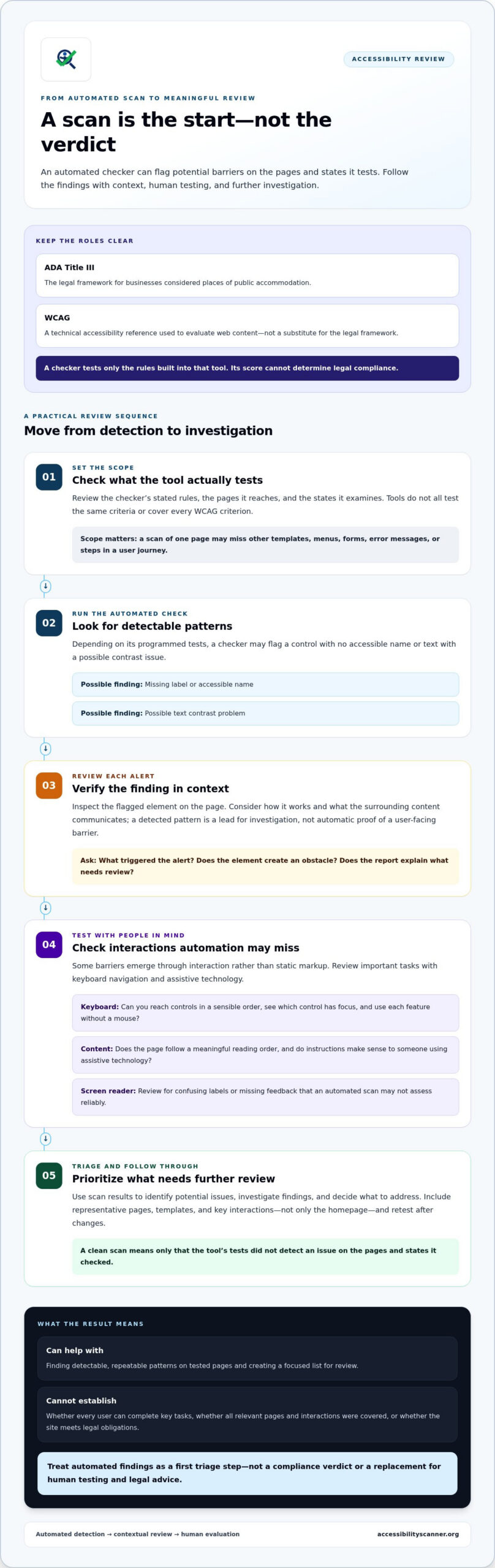
How to Triage Accessibility Findings with a Website Checker
A scan is useful only when its findings lead to action. Use a repeatable workflow to check representative parts of your site, verify alerts, and track follow-up. Do not stop at the homepage. Different templates and interactions can create different barriers, and a checker can report only on pages and states it can access.
Build a representative scan set
Choose pages that reflect real visitor tasks, such as navigation, forms, product or service details, and account flows. Include different templates, embedded media, and interactive components where relevant. Note steps that require a login or user action, since a scan may not reach those states automatically.
Then work through the review in order:
- Select representative pages. Cover key templates and task flows, not just the homepage.
- Scan and record. Save the page, finding, and scan date so each result has context.
- Review each alert. Check whether it describes a real issue on that page and in that interaction.
- Prioritize investigation. Consider potential user impact, how widely the issue appears, and whether it blocks an important task.
- Assign and track. Give each finding an owner and record its investigation, remediation, and retest status.
- Retest. Scan affected pages after updates, then record whether the finding changed or needs more review.
Turn scan findings into an action queue
Group repeated alerts by shared template or component. If the same potential issue appears on several pages using one form or navigation pattern, investigate the common element rather than treating each alert as unrelated. Confirm the cause before assigning work. An automated flag is a lead, not a verified barrier.
Prioritize based on practical user impact, reach, and task importance. For example, a potential barrier in a frequently used checkout or account flow may warrant prompt investigation because it could affect access to an important task. This is a triage method, not a universal legal ranking. Refer unclear findings or barriers that may prevent users from completing key interactions for appropriate human and professional review.
Keep a simple record of the finding, affected pages, owner, status, decision, and retest outcome. That record helps teams see what remains open and prevents scan results from disappearing after the initial review. An ada title iii website checker can support this first-pass process by surfacing potential issues for your team to investigate.
Run an automated accessibility scan to identify potential barriers across pages you select.
Choose a Checker That Fits Your Next Accessibility Step
Choose based on the question you need answered. Are you looking for an initial list of potential issues, tracking changes across a site, understanding how people use a page, or resolving a technical problem? These needs call for different steps. An automated checker can support the first one. It cannot certify ADA compliance, replace human evaluation, or answer legal questions.
A practical decision guide for website teams
Use automated scanning to surface potential issues on selected pages. It is a practical first screen when you need to identify what deserves closer review. If a finding depends on context, keyboard interaction, screen-reader use, or whether a task makes sense to visitors, add human evaluation. Changing code is a separate remediation step. For questions about legal obligations or exposure, consult qualified legal counsel rather than treating a scan score as a legal conclusion.
AccessibilityScanner.org offers website owners and developers a free automated first step for checking pages for potential accessibility gaps. The scan returns automated findings against ADA- and WCAG-related criteria. Use those results to plan an investigation, not as a certificate, guarantee, or substitute for broader evaluation.
Keep the purpose clear when comparing tools. A basic scanner helps identify potential issues. A monitoring tool may help track a site over time. Human evaluation examines barriers that automation may not judge reliably. Remediation addresses identified problems. A product that combines multiple functions is not necessarily the right fit if your immediate need is an initial scan.
What to do after the first scan
Start with the report. Check which pages and elements it covers, then investigate whether each flagged item creates an actual access barrier. Group repeated findings that appear to share a template or component. Prioritize based on user impact, how many parts of the site may be affected, and whether the issue interferes with an important task.
Record who owns each follow-up and whether it is under investigation, being addressed, or ready for retesting. After changes, scan the affected pages again and review the results. Repeat checks when content, templates, or interactive features change. A new scan can reveal potential issues on the pages tested, but it still cannot establish that every barrier has been found.
Need an initial view of potential website barriers? Scan a website for accessibility issues with AccessibilityScanner.org’s free automated checker. Treat the findings as a starting point for practical next steps, not a guarantee of ADA compliance.
Turn Your First Scan Into a Practical Next Step
An ada title iii website checker can help reveal potential accessibility issues, but its findings are only a starting point. Title III is a legal framework; WCAG provides technical criteria commonly used to assess web accessibility. Keep those roles distinct, and do not treat a scan score as proof of compliance.
Choose a tool that makes its test scope clear and gives you findings you can investigate. Scan representative pages, review alerts in context, and prioritize follow-up based on who may be affected and which tasks matter. Human evaluation may be needed to assess barriers that automation cannot reliably judge.
AccessibilityScanner.org offers free automated scanning with immediate issue detection, giving website owners a practical way to check pages independently and identify potential gaps. The scan does not certify ADA compliance or provide legal protection. Use it to decide what to review next, then track findings and retest as your site changes.
Run a free automated accessibility scan and take one clear step toward a more accessible website. Informed improvements start with knowing what to investigate.
Frequently Asked Questions
Is an ADA Title III website checker proof that my website complies with the ADA?
No. An ada title iii website checker reports potential issues its automated tests can detect on the pages it scans. It does not assess every accessibility barrier, make a legal determination, or certify compliance. Treat the report as a starting point: review findings in context, check important interactions, and plan further investigation where needed. A clear scan result means the tool did not flag an issue, not that every visitor can use the site.
Can an automated website checker find every ADA accessibility issue?
No. Automated tools can flag detectable patterns, such as certain missing labels or possible contrast concerns, depending on their test coverage. They may not judge whether keyboard navigation is logical, whether screen-reader content is understandable, or whether someone can complete a task. Scan results also depend on which pages and states the tool can reach. Combine automated checks with human evaluation of key pages and interactions to investigate potential barriers.
What should I compare when choosing an ADA Title III website checker?
Compare the checker’s stated test criteria, page coverage, and report clarity. Look for findings that identify the affected page and element and explain why they were flagged. Consider whether the tool can scan representative pages and whether repeat scans help you track changes. Do not rely on broad claims or a single score. A useful checker makes its scope clear and gives you information to investigate, not a compliance verdict.
Does WCAG compliance mean my website is automatically ADA compliant?
No. WCAG is a technical reference commonly used to evaluate web accessibility, while the ADA is a civil-rights law. A WCAG review can help identify accessibility issues, but a claim of conformance does not automatically resolve every question about ADA obligations or a person’s experience using the site. Check which WCAG version and criteria are relevant to your evaluation, and do not treat a scan score or WCAG label as a legal conclusion.
How many pages should I scan with an ADA website checker?
There is no universal page count that represents every website. Start with pages that cover distinct templates and important tasks, such as navigation, forms, product or service information, and account flows. Include pages with embedded media or interactive features where relevant. A homepage scan alone may miss issues elsewhere. Results cover only the pages and states the checker can access, so review important user journeys separately.
What should I do after an ADA Title III website checker finds issues?
Review each finding on the page where it appeared. Confirm whether it signals a potential barrier, group repeated alerts that may share a template or component, and prioritize investigation by user impact, reach, and task importance. Assign an owner and track the finding through investigation, remediation, and retesting. If an issue depends on interaction or user experience, arrange appropriate human evaluation. Rescan affected pages after updates, but do not treat retesting as legal certification.
Frequently Asked Questions
Is an ADA Title III website checker proof that my website complies with the ADA?
No. An ada title iii website checker reports potential issues its automated tests can detect on the pages it scans. It does not assess every accessibility barrier, make a legal determination, or certify compliance. Treat the report as a starting point: review findings in context, check important interactions, and plan further investigation where needed. A clear scan result means the tool did not flag an issue, not that every visitor can use the site.
Can an automated website checker find every ADA accessibility issue?
No. Automated tools can flag detectable patterns, such as certain missing labels or possible contrast concerns, depending on their test coverage. They may not judge whether keyboard navigation is logical, whether screen-reader content is understandable, or whether someone can complete a task. Scan results also depend on which pages and states the tool can reach. Combine automated checks with human evaluation of key pages and interactions to investigate potential barriers.
What should I compare when choosing an ADA Title III website checker?
Compare the checker’s stated test criteria, page coverage, and report clarity. Look for findings that identify the affected page and element and explain why they were flagged. Consider whether the tool can scan representative pages and whether repeat scans help you track changes. Do not rely on broad claims or a single score. A useful checker makes its scope clear and gives you information to investigate, not a compliance verdict.
Does WCAG compliance mean my website is automatically ADA compliant?
No. WCAG is a technical reference commonly used to evaluate web accessibility, while the ADA is a civil-rights law. A WCAG review can help identify accessibility issues, but a claim of conformance does not automatically resolve every question about ADA obligations or a person’s experience using the site. Check which WCAG version and criteria are relevant to your evaluation, and do not treat a scan score or WCAG label as a legal conclusion.
How many pages should I scan with an ADA website checker?
There is no universal page count that represents every website. Start with pages that cover distinct templates and important tasks, such as navigation, forms, product or service information, and account flows. Include pages with embedded media or interactive features where relevant. A homepage scan alone may miss issues elsewhere. Results cover only the pages and states the checker can access, so review important user journeys separately.
What should I do after an ADA Title III website checker finds issues?
Review each finding on the page where it appeared. Confirm whether it signals a potential barrier, group repeated alerts that may share a template or component, and prioritize investigation by user impact, reach, and task importance. Assign an owner and track the finding through investigation, remediation, and retesting. If an issue depends on interaction or user experience, arrange appropriate human evaluation. Rescan affected pages after updates, but do not treat retesting as legal certification.
Related guides

ADA Guidelines for Websites: A Clear 2026 Overview
What if “ADA compliant” isn’t a single website checklist? That’s the question behind many searches for ada guidelines. The answer depends partly on…
Read: ADA Guidelines for Websites: A Clear 2026 Overview
ADA Website Compliance Test: A Practical Checklist for 2026
What should an ada website compliance test actually tell you? A clean scan can feel reassuring, but automated tools only flag issues they can detect….
Read: ADA Website Compliance Test: A Practical Checklist for 2026
ADA Website Compliance: A Practical Guide for 2026
What if your website passes an accessibility scan but still blocks someone from using it? That risk is central to American with Disabilities Act…
Read: ADA Website Compliance: A Practical Guide for 2026