ADA Guidelines for Websites: A Clear 2026 Overview
What if “ADA compliant” isn’t a single website checklist? That’s the question behind many searches for ada guidelines. The answer depends partly on…

What if “ADA compliant” isn’t a single website checklist? That’s the question behind many searches for ada guidelines. The answer depends partly on who operates the site and which ADA requirements apply. For state and local government websites, the Department of Justice’s Title II rule points to WCAG 2.1 Level AA as the technical standard, with compliance deadlines extended to 2027 or 2028 depending on the entity.
It’s understandable to want one clear pass-or-fail test. But the ADA is a broad civil rights law, while the Web Content Accessibility Guidelines (WCAG) translate accessibility goals into practical criteria. The frameworks are related, but they aren’t interchangeable, and a website scan can’t make a legal determination.
This overview explains how the ADA and WCAG fit together, what current guidance means for different organizations, and how common barriers can interfere with using a site. You’ll also find practical steps, from checking keyboard access and image text alternatives to using a free automated scanner to flag issues for further review. Treat scan results as a starting point, not proof of compliance.
Key Takeaways
- Understand what the ada guidelines address and why website accessibility affects how people perceive, navigate, and use online content.
- Separate the ADA’s legal framework from DOJ rules and WCAG’s technical criteria to better understand how each applies.
- Use the POUR principles to spot barriers involving text alternatives, captions, keyboard access, forms, and contrast.
- Review key tasks and representative pages first, then investigate scan findings and validate important user journeys.
- Assign responsibility, document issues, and retest changes as part of an ongoing accessibility process.
What do ADA guidelines mean for a website?
The Americans with Disabilities Act (ADA) is a U.S. civil rights law, not the American Diabetes Association. For websites, accessibility means people with disabilities can perceive, navigate, and use online content, including information and interactive features. The ADA provides a legal framework; technical accessibility criteria describe specific ways to make digital content more usable. The phrase “ADA guidelines” is common shorthand, not the official name of one universal website checklist.
That distinction matters because legal obligations can depend on the organization and the rules that apply to it. Technical standards can help teams identify and address barriers, but they aren’t the text of the ADA itself. The Web Content Accessibility Guidelines (WCAG), developed by the World Wide Web Consortium, are a widely referenced set of technical criteria for digital accessibility.
Why do people use the phrase “ADA website guidelines”?
People searching for “ADA website guidelines” usually want a clearer sense of their organization’s accessibility responsibilities and practical steps for making a website easier to use. The phrase combines questions that statutes, regulations, guidance, and technical standards address in different ways. It’s useful shorthand for a search, but it doesn’t mean every website has the same explicit federal checklist.
Start by separating the terms. The ADA is the law. Department of Justice regulations and guidance explain how requirements apply in relevant contexts. WCAG provides testable technical criteria that can inform an accessibility review. Which obligations apply depends on the organization and circumstances, so don’t treat a generic checklist or scan result as a legal determination.
What does website accessibility look like in practice?
Accessibility shows up in everyday interactions, not just in a policy statement. A visitor might use a keyboard instead of a mouse, rely on a screen reader to understand page structure, turn on captions for a video, or magnify text and content. People’s needs and ways of using technology differ, so no single feature or testing method represents every experience.
Consider a common task: finding a service and submitting a form. Can a keyboard user reach each field and see which one is active? Can a screen reader identify the form labels and communicate error messages? Are instructions easy to follow, and does magnification make the page difficult to use? These questions connect accessibility to whether people can complete important tasks.
- Finding information: Headings and meaningful text alternatives can help people understand page content.
- Using controls: Keyboard access and visible focus help users move through links, menus, and forms.
- Following media: Captions can provide access to spoken information in videos.
These examples make the broad idea concrete: an accessible website reduces barriers to using its content and functions. They also lead to the next question: how do ADA requirements, DOJ rules, and WCAG criteria relate?
How do the ADA, DOJ rules, and WCAG fit together?
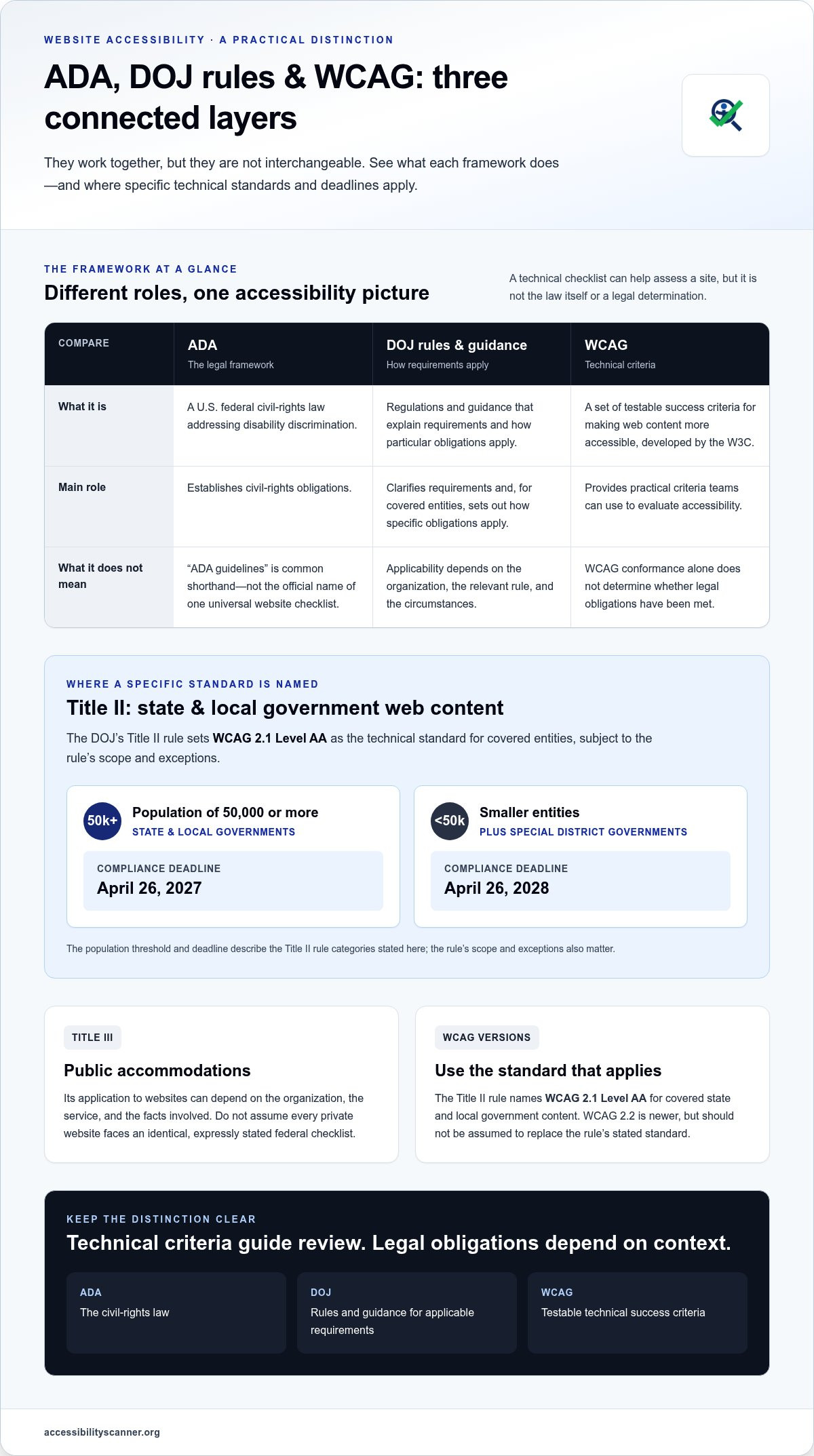
Think of the framework in three layers: the ADA establishes civil rights obligations, Department of Justice (DOJ) regulations and guidance explain how requirements apply, and WCAG offers technical criteria for evaluating accessibility. These layers are connected, but they aren’t interchangeable. WCAG is developed by the World Wide Web Consortium (W3C), and it isn’t the text of the ADA.
| Framework | Role |
|---|---|
| ADA | Federal civil-rights law addressing disability discrimination. |
| DOJ rules and guidance | Explain requirements and, for covered entities, set out how particular obligations apply. |
| WCAG | Technical success criteria for making web content more accessible. |
Which ADA titles are most relevant to websites?
Title II applies to state and local government services, including covered web and mobile content. The DOJ’s rule sets WCAG 2.1 Level AA as the technical standard for covered entities, subject to the rule’s scope and exceptions. As of October 2026, the compliance deadline is April 26, 2027, for state and local governments serving populations of 50,000 or more. Smaller entities and special district governments have until April 26, 2028.
Title III concerns public accommodations. Its application to websites can depend on the organization, the service, and the facts involved. Don’t assume that every private website faces an identical, expressly stated federal checklist. To understand the ada guidelines that matter to a particular organization, review current DOJ materials and consider the relevant legal context.
Is WCAG the same thing as ADA compliance?
No. WCAG provides testable success criteria. Conformance to a WCAG version can help teams assess and improve accessibility, but it doesn’t by itself determine whether an organization has met its legal obligations under the ADA. The applicable legal requirements depend on context.
The version matters, too. The DOJ’s Title II rule specifies WCAG 2.1 Level AA for covered state and local government content. WCAG 2.2 is a newer version, and the W3C’s WCAG 2.2 Quick Reference lets teams review its success criteria. Use the version required for your situation when assessing obligations. Treat newer criteria as technical guidance rather than assuming they replace the rule’s stated standard.
A free automated accessibility checker can flag potential website barriers for investigation. Its findings are a starting point, not a legal decision or proof of compliance.
Which accessibility principles do ADA-related website guidance and WCAG address?
WCAG organizes accessibility around four principles, often shortened to POUR. Use them as practical questions for reviewing a page, not as a complete description of every user’s needs. These examples illustrate the principles, but they don’t identify every applicable technical requirement or replace checking the relevant WCAG criteria.
- Perceivable: Can users access the information through the senses and tools they rely on?
- Operable: Can users navigate and control the interface?
- Understandable: Are content and interactions clear and predictable?
- Robust: Can different browsers and assistive technologies interpret the content reliably?
Accessible design supports people using different devices and assistive technologies by making information and tasks available through more than one way of interacting. It doesn’t mean every person will have the same experience. It means reducing avoidable barriers across common ways of accessing a site.
Can users perceive the information and media?
Start with what the page communicates. An informative image needs a meaningful text alternative so someone using a screen reader can understand its purpose. A control, such as a search button, also needs an accessible name that explains what it does. Decorative images may not need the same treatment as images that convey essential information.
Video and audio can hide information from people who can’t hear the sound or access the visuals. Captions can convey spoken content and relevant sounds. Other formats or descriptions may be needed to provide essential visual information. Check that text remains readable when enlarged and that foreground text stands apart clearly from its background. Low contrast can make instructions, labels, or links difficult to identify.
Can users operate and understand the interface?
Every key interaction should work without relying only on a mouse. A keyboard user needs to reach links, menus, and form controls, and see a visible focus indicator showing which item is active. If focus disappears or the tab order jumps unpredictably, users can lose their place or become stuck.
Clarity matters just as much. Give form fields descriptive labels and instructions before users need to act. If a submission fails, identify the problem in specific terms and help the user locate the field that needs attention. Clear headings and semantic structure also help people move through content and understand how sections relate.
Robust content uses meaningful structure and standard interface behavior so browsers and assistive technologies can interpret it. Compatibility can vary by setup, so a principle-based review is a useful starting point, not proof that every interaction works for every person. These checks give teams a practical way to apply ada guidelines to real pages and user tasks.
How can a website team turn ADA guidelines into a practical review?
Turn the principles into a repeatable review of the pages and tasks people rely on. Start with a focused sample, but follow the full journey. An automated scan can flag some issues that software can identify. It can’t judge every barrier or replace checking whether users can complete essential tasks. Use scan findings to guide investigation, not to declare the site compliant.
- Identify key tasks. List what visitors need to do, such as find information, use search, navigate menus, or submit a form.
- Choose representative pages. Include high-use pages and different page types, such as a service page, a results page, and a form.
- Scan and inspect. Run an automated check, then review findings on the affected pages. Look for repeated issues shared by a template.
- Validate user journeys. Test important flows with a keyboard and suitable assistive-technology checks. Confirm users can reach information and complete tasks.
An automated scan is evidence for triage, not a legal compliance certificate. A clean result doesn’t prove that every barrier has been found. Some issues require people to assess context, content, and the experience of using the site.
What should a first accessibility review include?
Keep the first review focused. Select pages that represent key tasks, including navigation, search, and forms. Run an automated scan to surface machine-identifiable issues, then group results by page or shared pattern to spot problems that may recur through a template. Next, test essential journeys with keyboard navigation and suitable assistive-technology checks. Record what blocked progress, not just what a tool flagged.
How should teams prioritize accessibility findings?
Start with barriers that prevent people from reaching important information or completing a task. A keyboard trap on a checkout or application flow deserves attention before a minor issue on a rarely visited page. Check whether a finding appears across multiple pages through a shared template. Track each issue’s location, affected experience, assigned owner, and retest status. This creates a practical work queue, not a legal-risk score.
Use the ada guidelines as a framework for ongoing review, not a one-time scan. Recheck affected pages after changes and confirm that the user journey works from start to finish. Run a free automated accessibility scan to identify potential issues and decide what to investigate next.
What are the next steps for applying ADA guidelines to your website?
Make accessibility ongoing work, not a one-time scan. Assign someone to track issues, set priorities, and confirm that changes have been retested. Build accessibility checks into content publishing, design, and development so new pages and features don’t reintroduce barriers.
How can a website team keep accessibility work moving?
Use a shared issue log. For each finding, record the affected page or task, a clear owner, the next action, and retest notes. Revisit important pages when layouts, forms, navigation, or third-party components change. This gives your team a practical record of what was found and whether the affected experience improved.
Legal obligations depend on the organization and circumstances. Consult authoritative ADA and Department of Justice materials to determine what applies to your organization. Use current official sources to confirm relevant details. This information can orient your review, but it isn’t legal advice.
When is an automated accessibility scan useful?
Use a scan to surface detectable issues on a page and create a focused starting list for investigation. Automated tools can help reveal patterns that may otherwise be easy to miss, but they don’t evaluate every user journey or determine whether a website meets legal obligations. Review scan findings in context, then test important tasks through the ways people use your site.
Keep the process simple: assign the issue, investigate the barrier, make the change through your normal workflow, and retest the affected page or journey. Repeat the cycle as the site changes. That turns the ada guidelines from an abstract topic into steady, trackable accessibility work.
Start with one page. Scan a page with the free accessibility checker to flag potential issues for review. Treat the results as a triage aid, not a compliance certificate.
Make your next accessibility review practical
The ada guidelines are best understood as a legal framework, not one universal website checklist. WCAG translates accessibility goals into technical criteria, while the rules that apply depend on your organization and circumstances. Start by checking whether people can access information, navigate pages, and complete essential tasks.
Then make accessibility ongoing work. Assign owners, document barriers, and retest pages after changes. Automated scans can flag some issues for investigation, but they can’t assess every user journey or determine legal compliance.
Take one practical step today. Use our free automated web accessibility checker to scan a page and identify potential issues for further review. Scan a web page for accessibility issues. Treat the results as a starting point, then investigate and validate how the page works for people using different ways to access it. Steady, focused improvements can make your website easier for more people to use.
Frequently Asked Questions
Are ADA guidelines for websites the same as WCAG?
No. The ADA is a civil rights law, while the Web Content Accessibility Guidelines (WCAG) are technical criteria developed by the World Wide Web Consortium. WCAG can help teams assess and improve website accessibility, and regulations may refer to a specific WCAG version. But WCAG isn’t the text of the ADA, and meeting a technical standard alone doesn’t make a legal determination about an organization’s obligations.
Does the ADA require every website to meet WCAG 2.2?
No. The ADA doesn’t establish a universal requirement that every website meet WCAG 2.2. The DOJ’s Title II rule specifies WCAG 2.1 Level AA for covered state and local government web and mobile content, subject to the rule’s scope and exceptions. WCAG 2.2 is a newer version, but that doesn’t automatically make it the legal standard for every organization. Determine which requirements apply to your situation.
What does ADA Title II require for government websites?
The DOJ’s Title II rule requires covered state and local government web content and mobile applications to conform to WCAG 2.1 Level AA, subject to specified exceptions. As of October 2026, the compliance deadline is April 26, 2027, for entities serving populations of 50,000 or more. Smaller entities and special district governments have until April 26, 2028. Check the current DOJ rule for details on scope and exceptions.
Can an automated accessibility scan confirm ADA compliance?
No. An automated scan can detect some machine-identifiable accessibility issues, such as certain missing text alternatives or coding patterns, but it can’t assess every barrier or user journey. A scan result is a starting point for further investigation, not a legal determination or compliance certificate. Review findings in context, then test important tasks, such as navigating with a keyboard and submitting a form.
What are common website accessibility barriers?
Common barriers include images without meaningful text alternatives, text that’s difficult to distinguish from its background, forms without clear labels or useful error messages, and navigation that can’t be used with a keyboard. Videos may also lack captions for spoken content. These issues can interfere with getting information or completing tasks. Their impact varies by person and technology, so combine automated checks with a review of key user journeys.
Does the ADA apply to private business websites?
Title III of the ADA covers public accommodations, but how it applies to a particular website can depend on the business, the services offered, and the facts. Don’t assume every private website has the same explicit federal technical checklist. WCAG is often used as a technical reference, but it isn’t itself the ADA. Consult current DOJ materials and qualified legal guidance to assess obligations for your organization.
Where should a website owner start with ADA guidelines?
Start by identifying the pages and tasks people rely on, such as finding essential information, using navigation, or completing a form. Run an automated scan to flag detectable issues, then investigate the findings and test key journeys with a keyboard and suitable assistive technology. Assign owners, record issues, and retest changes. The ada guidelines provide useful direction, but a scan alone can’t establish legal compliance.
Frequently Asked Questions
Are ADA guidelines for websites the same as WCAG?
No. The ADA is a civil rights law, while the Web Content Accessibility Guidelines (WCAG) are technical criteria developed by the World Wide Web Consortium. WCAG can help teams assess and improve website accessibility, and regulations may refer to a specific WCAG version. But WCAG isn’t the text of the ADA, and meeting a technical standard alone doesn’t make a legal determination about an organization’s obligations.
Does the ADA require every website to meet WCAG 2.2?
No. The ADA doesn’t establish a universal requirement that every website meet WCAG 2.2. The DOJ’s Title II rule specifies WCAG 2.1 Level AA for covered state and local government web and mobile content, subject to the rule’s scope and exceptions. WCAG 2.2 is a newer version, but that doesn’t automatically make it the legal standard for every organization. Determine which requirements apply to your situation.
What does ADA Title II require for government websites?
The DOJ’s Title II rule requires covered state and local government web content and mobile applications to conform to WCAG 2.1 Level AA, subject to specified exceptions. As of October 2026, the compliance deadline is April 26, 2027, for entities serving populations of 50,000 or more. Smaller entities and special district governments have until April 26, 2028. Check the current DOJ rule for details on scope and exceptions.
Can an automated accessibility scan confirm ADA compliance?
No. An automated scan can detect some machine-identifiable accessibility issues, such as certain missing text alternatives or coding patterns, but it can’t assess every barrier or user journey. A scan result is a starting point for further investigation, not a legal determination or compliance certificate. Review findings in context, then test important tasks, such as navigating with a keyboard and submitting a form.
What are common website accessibility barriers?
Common barriers include images without meaningful text alternatives, text that’s difficult to distinguish from its background, forms without clear labels or useful error messages, and navigation that can’t be used with a keyboard. Videos may also lack captions for spoken content. These issues can interfere with getting information or completing tasks. Their impact varies by person and technology, so combine automated checks with a review of key user journeys.
Does the ADA apply to private business websites?
Title III of the ADA covers public accommodations, but how it applies to a particular website can depend on the business, the services offered, and the facts. Don’t assume every private website has the same explicit federal technical checklist. WCAG is often used as a technical reference, but it isn’t itself the ADA. Consult current DOJ materials and qualified legal guidance to assess obligations for your organization.
Where should a website owner start with ADA guidelines?
Start by identifying the pages and tasks people rely on, such as finding essential information, using navigation, or completing a form. Run an automated scan to flag detectable issues, then investigate the findings and test key journeys with a keyboard and suitable assistive technology. Assign owners, record issues, and retest changes. The ada guidelines provide useful direction, but a scan alone can’t establish legal compliance.
Related guides

ADA Website Compliance Test: A Practical Checklist for 2026
What should an ada website compliance test actually tell you? A clean scan can feel reassuring, but automated tools only flag issues they can detect….
Read: ADA Website Compliance Test: A Practical Checklist for 2026
ADA Title III Website Checker: How to Evaluate the Right Tool in 2026
Can an automated scan tell you whether your business website meets ADA Title III expectations? An ada title iii website checker can flag potential…
Read: ADA Title III Website Checker: How to Evaluate the Right Tool in 2026
ADA Website Compliance: A Practical Guide for 2026
What if your website passes an accessibility scan but still blocks someone from using it? That risk is central to American with Disabilities Act…
Read: ADA Website Compliance: A Practical Guide for 2026