Free Web Accessibility Checker: Scan Pages Fast for ADA and WCAG Violations
Did you know that only about 4% of websites actually meet ADA compliance standards? With over 4,500 digital accessibility lawsuits filed in the US in…

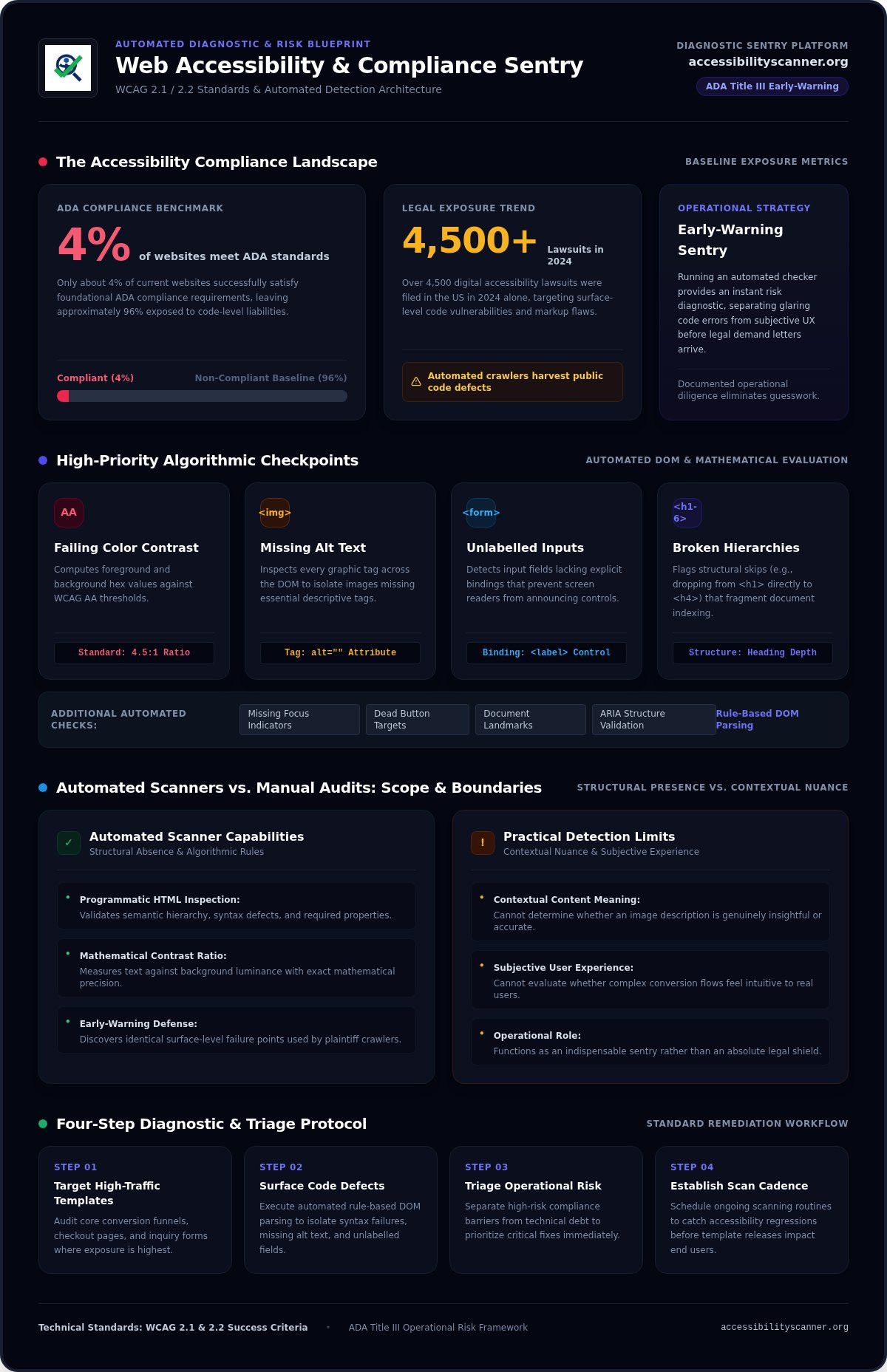
Did you know that only about 4% of websites actually meet ADA compliance standards? With over 4,500 digital accessibility lawsuits filed in the US in 2024, overlooked markup and design flaws create immediate operational liability. You shouldn’t have to decipher dense regulatory manuals or commit to expensive consulting retainers just to uncover your baseline exposure. Running a dependable free web accessibility checker gives you an instant early-warning sentry, pinpointing high-risk code barriers before they invite external legal scrutiny.
Wading through complex WCAG 2.1 and 2.2 success criteria is confusing, especially when you need to distinguish between urgent compliance risks and minor technical debt. In this guide, you’ll discover how to immediately scan your web pages for critical accessibility violations, interpret automated diagnostic findings, and establish a repeatable scanning cadence to catch regressions early. We’ll examine exactly what automated scanners detect, where their practical limits lie, and how to rapidly triage your site’s most visible barriers.
Key Takeaways
- Deploy a free web accessibility checker to instantly surface programmatic code flaws and reduce exposure to unexpected ADA Title III actions.
- Understand the distinct categories of markup failures, such as low-contrast text and unlabelled form fields, that automated tools capture with speed and precision.
- Recognize the clear boundaries of automated detection, treating programmatic scanners as an indispensable early-warning sentry rather than an absolute legal shield.
- Follow a systematic four-step diagnostic protocol to target high-traffic conversion templates and triage remediation efforts by operational risk.
- Establish an ongoing automated scanning routine to intercept accessibility regressions before template updates impact end users.
What Is a Free Web Accessibility Checker and Why Run One Today?
How confident are you that every visitor can navigate your checkout funnel or submit an inquiry? An automated web accessibility checker is a programmatic engine that parses raw HTML, CSS, and rendered Document Object Model (DOM) trees against published technical criteria. Broadly speaking, web accessibility ensures that digital systems accommodate individuals with diverse visual, auditory, motor, and cognitive capabilities. Instead of forcing manual inspection of thousands of code lines, a scanner executes rule-based algorithms to flag syntax defects, missing properties, and contrast mismatches instantly.
Speed matters when managing commercial exposure. Leveraging a dependable free web accessibility checker provides an immediate risk diagnostic, separating glaring markup errors from subjective user-experience considerations. It serves as your baseline evaluation, giving your team concrete technical targets rather than vague compliance theories.
The Operational Purpose of Automated Accessibility Scanners
Automated diagnostic tools execute precise rule sets against your rendered pages. They eliminate guesswork by auditing core presentation layers through automated checks:
- Programmatic HTML inspection: Validates semantic structure, nested hierarchy, and mandatory attributes like image descriptions and form labels.
- Algorithmic visual contrast analysis: Measures text color against background luminance using exact mathematical ratios established in WCAG standards.
- Interactive friction mapping: Pinpoints missing keyboard focus indicators, skipped heading tags, and dead button targets that disrupt screen readers.
These scanners evaluate code objectively. They determine whether an element satisfies programmatic requirements, pinpointing exact code failures without delay.
Why Proactive Site Scanning Outweighs Reactive Legal Defense
Waiting for a demand letter is an expensive risk-management strategy. Plaintiffs’ firms frequently utilize automated crawlers to harvest public websites with obvious, surface-level code vulnerabilities. If your public templates contain unlabelled inputs or missing document landmarks, automated scrapers spot them in seconds.
Deploying a free web accessibility checker lets you uncover those identical failure points first. Performing consistent, automated diagnostic scans creates documented operational diligence. While automated audits do not replace ongoing institutional commitments to inclusive design, they promptly illuminate your most visible operational liabilities, enabling your team to remediate high-exposure defects before external scrutiny forces your hand.
What Can an Automated Accessibility Checker Actually Detect?
Can software truly evaluate accessibility? Yes, but with strict algorithmic boundaries. Automation excels at detecting structural absence rather than contextual nuance. A scanner cannot tell you if an image description is insightful or if a workflow feels intuitive. It can, however, verify whether mandatory code elements exist in your page architecture. By auditing the rendered DOM against programmatic rules, a reliable free web accessibility checker uncovers concrete code failures with absolute precision.
High-Priority Algorithmic Checkpoints
Algorithmic crawlers evaluate mathematical values and syntax presence. They excel at flagging the universal defects that frequently trigger regulatory inquiries:
- Failing color contrast: Scanners compute foreground and background hex values, instantly flagging text that breaches WCAG AA contrast thresholds (such as 4.5:1 for normal text).
- Missing alternative text: Evaluators inspect every
<img>tag, isolating graphics that lack essentialaltattributes. - Unlabelled form controls: Algorithms detect input fields lacking explicit
<label>tags or descriptive name bindings, which prevent screen readers from announcing form fields properly. - Broken heading hierarchies: Checkers flag structural skips, such as dropping from an
<h1>directly to an<h4>, which fragments document indexing.
Programmatic Structure and ARIA Validation
Beyond visual calculations, automated checkers inspect structural markup. As the W3C details in its guidance on Selecting Web Accessibility Evaluation Tools, automated software delivers immense value by parsing code syntax that human reviewers often miss during routine visual browsing.
Scanners audit your underlying markup for critical mechanical defects:
- Missing root language tags: Omitting
lang="en"on the opening<html>tag forces screen readers to guess pronunciation rules, garbling audio output. - Empty buttons and links: Icon-only controls lacking text labels leave assistive device users stranded without navigable cues.
- Mismatched ARIA roles: Automated parsers flag invalid roles, duplicate element IDs, and broken ARIA references that override native browser behaviors.
These programmatic flaws represent high-risk exposure because automated scraping tools identify them instantly. If you want to benchmark your public templates against these technical criteria, deploy an on-demand audit using a free web accessibility checker to triage your baseline code barriers today.
Automated Scanners vs. Manual Audits: Understanding the Boundaries
Can software grant total legal immunity? Absolutely not. Believing that an automated scan delivers foolproof protection is a dangerous operational misconception. Industry research indicates that automated accessibility testing tools detect roughly 30% of accessibility issues. That technical boundary doesn’t diminish a scanner’s value; it defines its tactical role. Automated web accessibility testing functions as rapid reconnaissance, surfacing high-exposure programmatic flaws before third parties target them.
What Machine Code Alone Cannot Fully Determine
Algorithms parse code syntax, not subjective human experience. A validator can confirm whether an element complies with mathematical rules, but it cannot judge whether a real person can complete a transaction smoothly.
- Image context: A parser verifies that an
alttag is present, but it cannot verify whether the description meaningfully conveys complex charts or graphics. - Dynamic tab navigation: Checkers flag static missing tabindex attributes, yet they cannot guarantee that focus moves logically through complex single-page applications.
- Multi-step transaction flows: Software cannot evaluate whether a blind user can navigate dynamic error prompts, modal overlays, or multi-step checkout sequences without confusion.
Building an Honest Diagnostic Strategy
Contextual nuance requires human attention. The Department of Justice emphasizes this balance in its Guidance on Web Accessibility and the ADA, noting that automated tools are highly effective diagnostic instruments when paired with dedicated oversight.
Steer clear of vendors promising that automated javascript widgets or overlay scripts grant instant, bulletproof legal protection. They don’t. Courts and advocates routinely reject these short-cut solutions because they fail to remediate underlying structural DOM defects. Instead, treat a free web accessibility checker as your operational tripwire. Running regular scans helps you systematically eradicate recurring markup defects. Achieving zero errors on an automated audit doesn’t mean your accessibility journey is finished; it means you’ve successfully cleared the baseline barriers that create immediate legal vulnerability. If you’re still asking is my website ADA compliant and need a structured framework for evaluating your risk against WCAG 2.1 Level AA benchmarks, a dedicated compliance assessment can help you establish an accurate baseline.
How to Run a Free Scan and Triage Your Results Step by Step
Where do you begin when auditing a site with hundreds of indexed pages? Don’t waste cycles testing random blog archives. Accessibility compliance isn’t solved by haphazard spot-checking. You need a disciplined protocol that targets high-liability user pathways first. By executing targeted diagnostic tests with a free web accessibility checker, technical teams can convert messy audit data into clean sprint tasks within minutes.
Executing the Initial Diagnostic URL Scan
Begin by mapping the exact paths where user friction carries immediate business consequences. Focus on distinct template structures rather than individual URLs:
- Select core conversion templates: Audit your primary homepage, main service layout, contact form, and transaction checkout funnel.
- Input live production URLs: Run your page through the scanner in its natural state, ensuring dynamic assets and third-party scripts load completely.
- Isolate definitive failures: Separate hard syntax violations from subjective warnings. Automated flags like unlabelled inputs or invalid contrast ratios demand immediate developer intervention.
Triage and Prioritize Critical Failure Points
Raw automated reports can overwhelm development backlogs if you don’t triage by operational risk. Treat your results like an emergency room queue by grouping violations into three distinct remediation tiers:
- Tier 1: Global template infrastructure. Start with header, footer, and navigation components. Fixing an unlabelled search field or broken contrast in a shared global navigation solves hundreds of duplicate errors across your entire domain instantly.
- Tier 2: Severe interaction blockers. Prioritize missing form labels, dead link wrappers, and unannounced buttons inside transactional funnels. When an assistive tech user can’t submit an inquiry or complete a purchase, your liability peaks.
- Tier 3: Routine visual and semantic cleanup. Bundle color contrast tweaks and heading hierarchy adjustments into standard bi-weekly sprint tickets.
Translating audit results into discrete engineering tickets prevents organizational paralysis. You don’t need a multi-month consulting cycle to uncover where your site breaks down. Take immediate control of your baseline code quality and run an instant page audit today to see where your public templates stand.
Deploy AccessibilityScanner.org as Your Automated Digital Sentry
Why let hidden markup errors linger until someone points them out in a formal legal notice? Every template revision, third-party plugin update, or CMS publication can quietly introduce non-compliant elements into your DOM. You don’t need to sign multi-year agency agreements or sit through sales calls just to understand your current exposure. Utilizing an agile, free web accessibility checker provides the immediate visibility required to protect your digital perimeter.
AccessibilityScanner.org functions as an automated digital sentry. The tool delivers instant, unvarnished diagnostic feedback without requiring tracking scripts, software downloads, or invasive browser extensions. It focuses purely on detection, pinpointing structural defects so your team can triage liabilities on your own terms.
Fast, Independent Compliance Auditing
Clarity drives effective engineering. Diagnostic tools should simplify workflow priorities rather than create technical friction. Operating AccessibilityScanner.org gives you three distinct advantages:
- Zero-friction diagnostics: Test any live URL instantly without installing heavy local software or embedding third-party code that slows down your production pages.
- Objective criteria alignment: Get direct, unambiguous validation reports mapping discovered code barriers against core WCAG 2.1 and WCAG 2.2 checkpoints.
- Continuous release protection: Scan public landing pages and published staging templates before deployment cycles expose new barriers to end users.
This focused operational approach eliminates unwanted retainers. The platform does not sell remediation services, code changes, or legal advice. Instead, it provides pure diagnostic intelligence, alerting you to critical violations while keeping remediation authority completely in your internal team’s hands.
Immediate Diagnostic Action
Stop guessing how your digital properties hold up against technical standards. When you give engineers precise line-item defects, remediation shifts from an intimidating, abstract compliance burden into routine maintenance tickets. Immediate scanning helps you uncover missing form attributes, broken element structures, and contrast errors before external auditors run the exact same checks against your site.
Take direct control of your operational risk today. Run your first page audit using our free web accessibility checker at AccessibilityScanner.org and resolve your visible code barriers immediately.
Take Immediate Control of Your Digital Accessibility Posture
Digital compliance isn’t a static milestone; it’s an ongoing operational standard. Treating automated scans as an early-warning sentry empowers your technical team to intercept high-liability DOM defects before they trigger external legal scrutiny. Running a reliable free web accessibility checker provides the diagnostic clarity you need to categorize markup failures, isolate global template errors, and systematically remediate your code.
You don’t need heavy software installations or complex consulting retainers to establish an effective baseline audit trail. With instant algorithmic evaluation against WCAG and ADA criteria, you can inspect your production pages in seconds. Scan your website for accessibility errors now at AccessibilityScanner.org to receive completely free diagnostic reporting focused strictly on actionable code barriers. Protecting your digital properties begins with knowing exactly where you stand, and taking that first proactive step is well within your control.
Frequently Asked Questions
Can a free web accessibility checker guarantee my site is 100% ADA compliant?
No automated tool can guarantee complete legal immunity or 100% ADA compliance. Automated scanners evaluate objective code syntax and mathematical contrast, detecting roughly 30% of standard accessibility barriers. They function as an indispensable early-warning tripwire for visible programmatic defects rather than an absolute legal shield. Comprehensive risk management requires pairing automated scans with human evaluation, as software cannot evaluate subjective user experience or complex interaction flows.
What is the difference between WCAG 2.1 and WCAG 2.2 checkers?
WCAG 2.2 expands upon WCAG 2.1 by introducing focused criteria targeting mobile interaction, motor impairment, and cognitive accessibility. A modern scanner configured for WCAG 2.2 evaluates additional checkpoints, such as minimum target sizes for clickable elements and redundant entry safeguards in form workflows. Because WCAG 2.2 is backward-compatible, identifying and resolving its criteria ensures your site inherently satisfies baseline WCAG 2.1 benchmarks across standard templates.
How often should digital teams run an automated web accessibility check?
Digital teams should execute an automated check after every major template release or at least once a month. Web content evolves constantly through CMS updates, marketing landing page additions, and third-party script integrations. Integrating a dependable free web accessibility checker into your monthly sprint cycle catches regressions before they reach end users, preventing technical debt and operational exposure from quietly accumulating across your domain.
Will an automated accessibility checker slow down my live website during testing?
No, running an automated scan won’t degrade performance for your live visitors. Diagnostic scanners evaluate individual web pages through standard HTTP requests, parsing rendered DOM elements just like a typical browser. Because the scan requires no invasive monitoring scripts, tracking pixels, or software installations on your production server, your infrastructure treats the audit like a single standard visitor viewing a page.
Can automated scanners detect accessibility errors inside password-protected customer portals?
Standard automated tools cannot scan pages behind authentication firewalls or user logins without specific credentials. Most scanners analyze publicly reachable URLs to evaluate customer-facing exposure. To audit restricted portals, development teams typically test equivalent components on staging servers or evaluate shared design system templates in public sandbox environments, ensuring core markup patterns remain accessible before user authentication takes place.
What should our team do immediately after an automated scan identifies dozens of errors?
Triage your scan findings by operational impact rather than trying to fix everything at once. Focus first on global template components, such as your site header, navigation menu, and footer, which immediately clears repetitive violations across hundreds of pages. Deploying a reliable free web accessibility checker gives your engineers a clean, prioritized issue list, transforming an intimidating compliance backlog into straightforward developer maintenance tickets.
Frequently Asked Questions
Can a free web accessibility checker guarantee my site is 100% ADA compliant?
No automated tool can guarantee complete legal immunity or 100% ADA compliance. Automated scanners evaluate objective code syntax and mathematical contrast, detecting roughly 30% of standard accessibility barriers. They function as an indispensable early-warning tripwire for visible programmatic defects rather than an absolute legal shield. Comprehensive risk management requires pairing automated scans with human evaluation, as software cannot evaluate subjective user experience or complex interaction flows.
What is the difference between WCAG 2.1 and WCAG 2.2 checkers?
WCAG 2.2 expands upon WCAG 2.1 by introducing focused criteria targeting mobile interaction, motor impairment, and cognitive accessibility. A modern scanner configured for WCAG 2.2 evaluates additional checkpoints, such as minimum target sizes for clickable elements and redundant entry safeguards in form workflows. Because WCAG 2.2 is backward-compatible, identifying and resolving its criteria ensures your site inherently satisfies baseline WCAG 2.1 benchmarks across standard templates.
How often should digital teams run an automated web accessibility check?
Digital teams should execute an automated check after every major template release or at least once a month. Web content evolves constantly through CMS updates, marketing landing page additions, and third-party script integrations. Integrating a dependable free web accessibility checker into your monthly sprint cycle catches regressions before they reach end users, preventing technical debt and operational exposure from quietly accumulating across your domain.
Will an automated accessibility checker slow down my live website during testing?
No, running an automated scan won’t degrade performance for your live visitors. Diagnostic scanners evaluate individual web pages through standard HTTP requests, parsing rendered DOM elements just like a typical browser. Because the scan requires no invasive monitoring scripts, tracking pixels, or software installations on your production server, your infrastructure treats the audit like a single standard visitor viewing a page.
Can automated scanners detect accessibility errors inside password-protected customer portals?
Standard automated tools cannot scan pages behind authentication firewalls or user logins without specific credentials. Most scanners analyze publicly reachable URLs to evaluate customer-facing exposure. To audit restricted portals, development teams typically test equivalent components on staging servers or evaluate shared design system templates in public sandbox environments, ensuring core markup patterns remain accessible before user authentication takes place.
What should our team do immediately after an automated scan identifies dozens of errors?
Triage your scan findings by operational impact rather than trying to fix everything at once. Focus first on global template components, such as your site header, navigation menu, and footer, which immediately clears repetitive violations across hundreds of pages. Deploying a reliable free web accessibility checker gives your engineers a clean, prioritized issue list, transforming an intimidating compliance backlog into straightforward developer maintenance tickets.
Related guides

WCAG Guidelines in Plain English: Principles, Levels, and Practical Meaning
What if treating accessibility as a pass-or-fail checklist leaves the biggest barriers untouched? The wcag guidelines can feel like a maze of…
Read: WCAG Guidelines in Plain English: Principles, Levels, and Practical Meaning
Wix Website ADA Compliance Check: A Practical Guide for 2026
What if an accessibility scan looks clean but your Wix site still has barriers? Automated tools can flag common issues, but they can’t judge every…
Read: Wix Website ADA Compliance Check: A Practical Guide for 2026
WCAG Compliance Scanner: How to Choose the Right Tool
What if a clean scan gives you confidence while users still face barriers? A wcag compliance scanner can flag common issues, but an automated result…
Read: WCAG Compliance Scanner: How to Choose the Right Tool