Free ADA Compliance Checker: Test Your Website Risk in 2026
If a plaintiff attorney audited your website today, would your code survive the first sixty seconds? With federal ADA website accessibility lawsuits…

If a plaintiff attorney audited your website today, would your code survive the first sixty seconds? With federal ADA website accessibility lawsuits projected to hit 6,176 in 2026, digital exposure is a concrete operational liability. You are likely exhausted by predatory demand letters, shifting WCAG 2.1 and 2.2 benchmarks, and commercial overlay widgets that promise complete immunity while leaving real accessibility barriers intact. Deploying a reliable free ada compliance checker cuts through the confusion, establishing an immediate, unvarnished diagnostic baseline before an aggressive plaintiff firm targets your vulnerabilities.
Automated tools aren’t magic shields or legal counsel, but they deliver vital tactical visibility. In this guide, you will learn how to instantly detect machine-testable WCAG violations, assess your true vulnerability under ADA Title III benchmarks, and triage high-risk barriers across your site. We explore how diagnostic scanners pinpoint exact code failures, where automated detection stops, and how to build a clear operational plan to protect your digital presence in 2026.
Key Takeaways
- Understand the boundaries of automated testing by learning which programmatic DOM errors scanners catch and which subjective barriers require human review.
- Deploy a free ada compliance checker to uncover critical Level A and Level AA code failures across your core templates within seconds.
- Identify the high-frequency WCAG violations most commonly cited by plaintiffs in predatory digital accessibility demand letters.
- Execute a systematic triage framework to isolate and prioritize remediation on high-conversion assets like navigation menus, forms, and checkouts.
- Recognize why automated overlay widgets fail to eliminate liability and how independent diagnostic scanners deliver unvarnished, actionable risk data.
What a Free ADA Compliance Checker Can and Cannot Detect
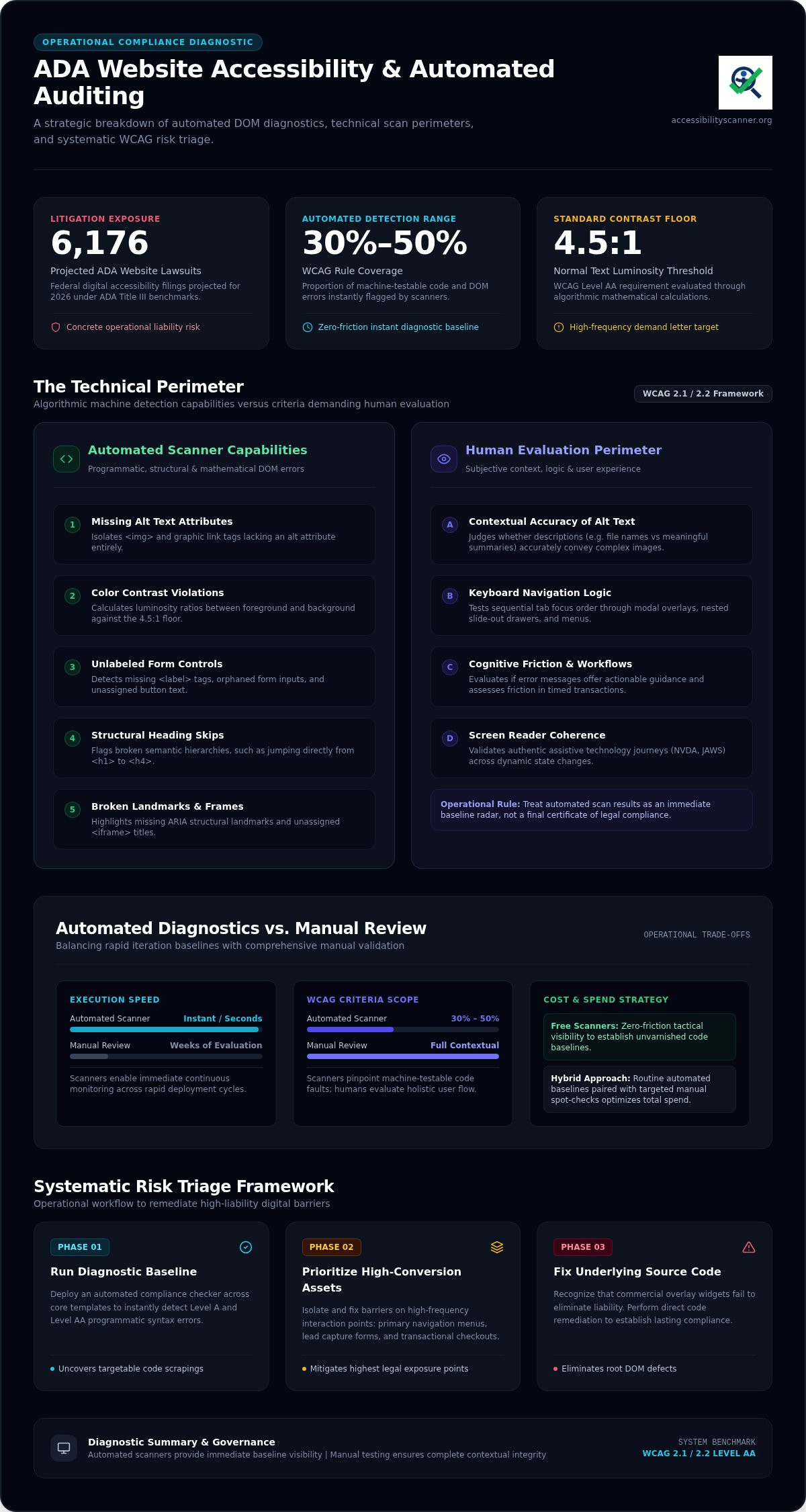
Can an algorithm tell you if your website is truly accessible? Not entirely. An automated scanner operates by parsing Document Object Model (DOM) elements against codified algorithmic rule sets. It crawls source code, measures mathematical values, and flags missing attributes. Running a free ada compliance checker provides an indispensable vulnerability radar, but understanding its technical perimeter is critical for operational triage.
Automated platforms evaluate pages against the Web Content Accessibility Guidelines (WCAG), translating abstract rules into binary pass-or-fail tests. If an issue is strictly structural, code-level, or mathematical, a machine catches it in seconds. However, accessibility involves human comprehension, logical flow, and interactive context. When software attempts to interpret meaning rather than syntax, automated detection hits a hard wall.
Programmatic Barriers Caught Instantly by Automated Scans
Automated tools excel at uncovering objective syntax errors that predatory scrapers leverage. Scanners immediately isolate these high-risk technical faults:
- Missing alternative text attributes: Scanners flag
<img>and graphic link tags that lack analtattribute entirely. - Color contrast failures: Algorithms calculate exact luminosity ratios between text and background surfaces, catching violations beneath the WCAG 4.5:1 threshold for normal text.
- Unlabeled form controls: Missing
<label>tags, orphaned inputs, and unassigned button text are highlighted instantly. - Structural heading skips: Broken hierarchies, such as jumping directly from an
<h1>to an<h4>, get flagged before they disorient screen readers. - Broken frames and landmarks: Unlabeled
<iframe>titles and absent ARIA structural landmarks surface right away.
Subjective WCAG Criteria That Require Human Evaluation
Algorithms cannot experience a website. A machine confirms whether an attribute exists, but it cannot judge whether that attribute makes sense to a human user. Evaluating these subjective criteria requires manual inspection:
- Contextual accuracy of alt text: A scanner verifies that an
altstring is present. It cannot determine if “image_10492.jpg” or “red shoes” accurately conveys the meaning of an intricate product diagram. - Keyboard navigation logic: Tools verify that elements accept keyboard focus, but they cannot assess whether focus order moves logically through dynamic modal overlays or nested slide-out navigation drawers.
- Cognitive clarity: Software cannot measure whether error prompts provide actionable instructions or if timed transactional workflows create insurmountable cognitive friction.
Use a free ada compliance checker to catch the programmatic breaks that draw demand letters. Treat those machine results as your immediate operational starting point, not a final certificate of compliance.
Automated Scanner vs Manual Review: Risk and Detection Comparison
Should you commission an expensive agency audit or run automated diagnostics? Making that call requires understanding operational trade-offs. Automated scanners flag roughly 30% to 50% of all WCAG criteria, delivering instant visibility into programmatic faults. Manual audits cover the remaining human-centric criteria, but they require weeks of evaluation and substantial professional fees. For growing organizations, combining a routine automated baseline with targeted manual spot-checks optimizes overall spend without stalling momentum.
Comparing Speed, Coverage, and Cost Across Audit Formats
Speed defines automated testing. Running an automated diagnostic provides immediate, zero-friction analysis across critical page templates. Conversely, manual assessments involve human specialists testing interactive user journeys with assistive technologies like NVDA or JAWS. While comprehensive, manual testing cannot match the rapid iteration cycles digital teams demand today.
| Dimension | Automated Scanner | Manual Expert Review |
|---|---|---|
| Turnaround Time | Instant (seconds per URL) | 2 to 4 weeks per audit |
| WCAG Coverage | 30% to 50% (machine-testable) | Up to 100% of applicable rules |
| Cost Structure | Free baseline diagnostic | High professional service fees |
| Primary Purpose | Rapid vulnerability triage | Formal validation & certification |
The Legal Liability Reality of Automated Tools
No scanning tool offers complete legal immunity. The Department of Justice emphasizes in its official guidance on web accessibility that businesses have flexibility in how they achieve compliance, but barriers must be removed. Predatory plaintiff law firms don’t manually browse your site for subtle nuances. Instead, they run automated scrapers to identify blatant, machine-detectable failures before mailing demand letters. In 2025 alone, over 5,000 digital accessibility lawsuits were filed across state and federal dockets.
Eliminating automated errors neutralizes the low-hanging fruit that litigation scrapers seek out. Running a dependable free ada compliance checker allows your developers to catch and patch these surface-level vulnerabilities before an adversarial scan flags them, keeping your operational triage fast, focused, and effective.
Critical WCAG Errors Flagged by an Accessibility Checker
Which specific code errors actually trigger litigation? While the Web Content Accessibility Guidelines encompass dozens of criteria, legal complaints overwhelmingly cite the exact same handful of programmatic failures. E-commerce platforms bore the brunt of this exposure in early 2026, representing 79% of all federal digital accessibility lawsuits. Plaintiffs target transactional barriers that block essential consumer actions like filtering products, filling forms, and completing checkouts. Deploying a free ada compliance checker surfaces these blocking elements instantly, pinpointing the precise code strings that demand immediate developer triage.
Universities and accessibility advocates widely recognize the utility of automated accessibility evaluation tools to flag baseline compliance breakdowns before they disrupt end users. Addressing machine-detectable Level A and AA failures neutralizes the vast majority of boilerplate digital filings.
Visual and Structural Failures in Website Code
Visual and structural bugs disorient users relying on screen magnification or customized browser style sheets. Automated tools catch these blatant layout flaws instantly:
- Failing color contrast ratios (WCAG 1.4.3): Text elements falling below the required 4.5:1 ratio against their background render copy illegible for low-vision visitors.
- Empty links and unlabelled icon buttons (WCAG 2.4.4 & 4.1.2): Social media icons, search toggles, and cart links with missing inner text leave screen-reader users with unannounced, mysterious links.
- Skipped heading structures (WCAG 1.3.1): Leaping from an
<h1>directly to an<h3>fragments page architecture, preventing assistive tech users from scanning section outlines efficiently.
Interactive and Assistive Technology Barriers
Interactive barriers represent the highest litigation risk because they prevent visitors from completing core user tasks. When an interface traps or silences assistive devices, legal exposure spikes:
- Orphaned form labels (WCAG 3.3.2): Text inputs lacking explicitly associated
<label>tags mean blind shoppers cannot determine whether a field asks for an email, phone number, or billing address. - Keyboard traps and missing focus states (WCAG 2.1.1 & 2.4.7): Modals, pop-ups, and hamburger menus that trap keyboard focus or hide the visible focus ring leave non-mouse users completely stranded.
- Missing root document language (WCAG 3.1.1): Omitting the
lang="en"attribute on the primary<html>tag forces screen-reading synthesis engines to default to improper pronunciation rules.
Running a targeted scan with an automated free ada compliance checker highlights these severe functional blockers directly in your source code. Triage these interactive breaks first to protect your organization and keep conversion pathways open to everyone.
Step-by-Step Triage: How to Run a Compliance Scan and Prioritize Fixes
Facing hundreds of technical errors across an entire domain sounds paralyzing. It doesn’t have to be. Rather than attempting to patch every page simultaneously, agile teams isolate systemic flaws inside core templates. With an estimated 95.9% of website homepages containing detectable WCAG failures in 2026, running an initial scan through a reliable free ada compliance checker provides the immediate diagnostic baseline needed to orchestrate an orderly, methodical cleanup.
Phase One: Mapping Core Page Templates for Initial Diagnostics
Don’t scan ten thousand URLs at once. Audit your structural blueprints instead. Focus your initial diagnostic runs on high-traffic, high-exposure pages that define user journeys:
- The primary homepage and main navigation hub.
- Lead generation portals, registration pages, and contact forms.
- Core e-commerce catalog templates and transactional checkout funnels.
Scan these specific URLs to uncover recurring template errors. Flaws originating in global headers, search bars, or footers replicate across every single page on your domain. Fixing them at the template source cleans thousands of downstream URLs instantly.
Phase Two: Classifying Findings by Severity and Business Exposure
Triage demands rigorous classification. Once your automated report generates, sort violations into three operational tiers:
- Critical functional blockers: Missing form labels, broken submission buttons, and keyboard traps. These faults prevent visitors from completing transactions and create immediate legal liability. Remediate these first.
- Global structural faults: Heading skips, invalid ARIA roles, and empty navigation tags located within shared global components.
- Content-level oversights: Missing alt text on editorial blog images or localized low-contrast text blocks inside marketing banners.
Phase Three: Retesting and Verification Workflow
Development changes mean little until verified against automated benchmarks. Follow this closed-loop workflow to guarantee issue elimination:
- Push targeted code patches directly to your staging or development environment.
- Re-scan the modified template URL to confirm the failure count drops to zero.
- Deploy the verified source code to your production server.
- Establish recurring automated audit intervals to catch unexpected regressions introduced during routine feature releases.
Tackle your operational liabilities with real diagnostic data. Run your free website accessibility scan now to uncover hidden code barriers, isolate high-risk templates, and equip your engineering team with an exact remediation roadmap.
Establishing an Automated Baseline with AccessibilityScanner.org
How do you transition from compliance anxiety into systematic control? You start with clean, unvarnished diagnostic facts. AccessibilityScanner.org delivers an independent, zero-friction automated web accessibility scanner designed to evaluate your site against current ADA and WCAG rules. There are no mandatory software installations, complex environment configurations, or enterprise sales calls required to see your code-level exposure. Running a straightforward free ada compliance checker provides your internal technical team with an immediate, objective inventory of machine-testable violations.
Automated scanning does not provide legal advice, manual testing, or automated code writes. Instead, it serves as a reliable sentry. By mapping direct DOM faults against WCAG 2.1 and WCAG 2.2 success criteria, it gives digital decision-makers the raw diagnostic transparency necessary to prioritize real developer fixes.
Why Direct Diagnostic Scans Outperform Quick-Fix Overlays
Temporary fixes often create permanent liabilities. Commercial JavaScript widgets and automated overlays market themselves as instant compliance shields. The legal reality tells a completely different story. Plaintiffs regularly sue websites running these overlays because third-party scripts do not fix broken underlying markup. They simply rest on top of it, frequently clashing with the assistive technologies screen-reader users rely on every day.
Direct diagnostic scanners solve this problem at the root. Rather than masking broken elements, an automated checker identifies the exact source code failures across your templates. Your development team can then execute native code repairs. Patching raw HTML, CSS, and ARIA attributes eliminates friction for real visitors while building genuine, defensible digital accessibility directly into your product architecture.
Next Steps to Protect Your Digital Operations
Proactive digital governance follows an orderly, repeatable progression. Take these immediate operational steps to secure your web properties:
- Execute a baseline diagnostic: Run your primary domain and key conversion paths through a free ada compliance checker to catch programmatic liabilities.
- Deliver structured diagnostics to developers: Hand the raw failure reports directly to your web engineering team so they can target high-risk form inputs, contrast failures, and structural bugs without guesswork.
- Establish systematic checking checkpoints: Integrate regular automated scans into your release cycle. Continuous testing ensures that newly published marketing copy, template iterations, or third-party plug-ins do not introduce unexpected compliance regressions.
Take Immediate Control of Your Website Accessibility
Waiting for a demand letter is an expensive operational strategy. Website accessibility compliance in 2026 isn’t an abstract regulatory debate; it’s a concrete operational discipline. While automated scans cannot replace human nuance or offer legal counsel, they deliver the rapid diagnostic visibility required to catch structural faults before predatory scrapers strike. Resolving high-risk WCAG breaks in your primary templates systematically neutralizes the exact programmatic failures driving federal ADA Title III lawsuits.
You don’t need complex software setups, invasive script installations, or deceptive quick-fix widgets to protect your brand. Running an independent free ada compliance checker gives you immediate baseline clarity with zero software overhead, zero vendor lock-in, and zero false promises. Run a free ADA and WCAG compliance scan on your website today to pinpoint code-level barriers, equip your developers with actionable data, and build an inclusive digital presence with total confidence.
Frequently Asked Questions
Is a free ADA compliance checker sufficient to guarantee legal protection?
No automated tool can guarantee total legal protection or lawsuit immunity. A free ada compliance checker identifies machine-testable WCAG failures that plaintiff firms scrape for, drastically shrinking your public vulnerability profile. However, full legal compliance under ADA Title III involves human usability that software alone cannot evaluate. Scanners provide fast diagnostic triage, not formal legal counsel or complete liability shields.
What is the difference between ADA Title III and WCAG standards?
The Americans with Disabilities Act is federal civil rights legislation, while the Web Content Accessibility Guidelines represent technical technical specifications. Title III prohibits discrimination against individuals with disabilities in places of public accommodation. Because federal statute does not codify specific web code criteria for private businesses, United States courts consistently use WCAG 2.1 Level AA as the practical legal benchmark for accessible digital experiences.
Can an automated accessibility checker scan an entire website at once?
Most free automated diagnostic scanners evaluate individual page URLs rather than crawling massive domains in a single pass. The most effective strategy involves scanning primary template blueprints such as your homepage, contact portal, and primary conversion workflows. Because modern Content Management Systems generate pages from global templates, fixing programmatic errors on key parent layouts repairs thousands of downstream URLs across your site simultaneously.
Why do automated accessibility tools miss certain WCAG 2.1 and 2.2 violations?
Algorithms parse code syntax mathematically, but they cannot evaluate human cognitive context or subjective user experience. An automated checker easily validates the mathematical presence of an image alt attribute or contrast luminosity ratio. It cannot verify whether an image description accurately conveys visual meaning, whether tab navigation order feels logical to a keyboard user, or whether written checkout instructions provide understandable guidance.
Do accessibility widgets or overlays replace the need for an automated scanner?
No, accessibility widgets do not replace automated scanners or eliminate legal risk. Overlays act as temporary JavaScript skins that frequently conflict with assistive software while leaving broken source code untouched. Running an independent free ada compliance checker reveals genuine DOM and markup defects. That data empowers your developers to implement clean, native code corrections rather than relying on superficial, litigable patches.
How often should a website run an automated ADA accessibility test?
Digital teams should test accessibility continuously throughout their routine publishing and deployment workflows. At minimum, execute a fresh scan whenever your engineers deploy template updates, reconfigure navigation menus, or introduce third-party plugins. Performing scheduled monthly audit checkpoints ensures that everyday content additions don’t silently create programmatic accessibility breaks that invite predatory legal demand letters.
Frequently Asked Questions
Is a free ADA compliance checker sufficient to guarantee legal protection?
No automated tool can guarantee total legal protection or lawsuit immunity. A free ada compliance checker identifies machine-testable WCAG failures that plaintiff firms scrape for, drastically shrinking your public vulnerability profile. However, full legal compliance under ADA Title III involves human usability that software alone cannot evaluate. Scanners provide fast diagnostic triage, not formal legal counsel or complete liability shields.
What is the difference between ADA Title III and WCAG standards?
The Americans with Disabilities Act is federal civil rights legislation, while the Web Content Accessibility Guidelines represent technical technical specifications. Title III prohibits discrimination against individuals with disabilities in places of public accommodation. Because federal statute does not codify specific web code criteria for private businesses, United States courts consistently use WCAG 2.1 Level AA as the practical legal benchmark for accessible digital experiences.
Can an automated accessibility checker scan an entire website at once?
Most free automated diagnostic scanners evaluate individual page URLs rather than crawling massive domains in a single pass. The most effective strategy involves scanning primary template blueprints such as your homepage, contact portal, and primary conversion workflows. Because modern Content Management Systems generate pages from global templates, fixing programmatic errors on key parent layouts repairs thousands of downstream URLs across your site simultaneously.
Why do automated accessibility tools miss certain WCAG 2.1 and 2.2 violations?
Algorithms parse code syntax mathematically, but they cannot evaluate human cognitive context or subjective user experience. An automated checker easily validates the mathematical presence of an image alt attribute or contrast luminosity ratio. It cannot verify whether an image description accurately conveys visual meaning, whether tab navigation order feels logical to a keyboard user, or whether written checkout instructions provide understandable guidance.
Do accessibility widgets or overlays replace the need for an automated scanner?
No, accessibility widgets do not replace automated scanners or eliminate legal risk. Overlays act as temporary JavaScript skins that frequently conflict with assistive software while leaving broken source code untouched. Running an independent free ada compliance checker reveals genuine DOM and markup defects. That data empowers your developers to implement clean, native code corrections rather than relying on superficial, litigable patches.
How often should a website run an automated ADA accessibility test?
Digital teams should test accessibility continuously throughout their routine publishing and deployment workflows. At minimum, execute a fresh scan whenever your engineers deploy template updates, reconfigure navigation menus, or introduce third-party plugins. Performing scheduled monthly audit checkpoints ensures that everyday content additions don’t silently create programmatic accessibility breaks that invite predatory legal demand letters.
Related guides

WCAG Guidelines in Plain English: Principles, Levels, and Practical Meaning
What if treating accessibility as a pass-or-fail checklist leaves the biggest barriers untouched? The wcag guidelines can feel like a maze of…
Read: WCAG Guidelines in Plain English: Principles, Levels, and Practical Meaning
Wix Website ADA Compliance Check: A Practical Guide for 2026
What if an accessibility scan looks clean but your Wix site still has barriers? Automated tools can flag common issues, but they can’t judge every…
Read: Wix Website ADA Compliance Check: A Practical Guide for 2026
WCAG Compliance Scanner: How to Choose the Right Tool
What if a clean scan gives you confidence while users still face barriers? A wcag compliance scanner can flag common issues, but an automated result…
Read: WCAG Compliance Scanner: How to Choose the Right Tool