ADA Website Compliance: A Practical Guide for 2026
What if your website passes an accessibility scan but still blocks someone from using it? That risk is central to American with Disabilities Act…

What if your website passes an accessibility scan but still blocks someone from using it? That risk is central to American with Disabilities Act website compliance. It’s natural to look for one clear rule or a scan that confirms your site is covered. But legal responsibilities depend on the organization, and automated tools can’t identify every barrier.
For state and local government entities, the ADA’s Title II rule specifies WCAG 2.1 Level AA. For private businesses, Title III doesn’t set a specific technical standard, though WCAG is widely used as a practical benchmark. Understanding how these frameworks relate can help you make informed decisions without mistaking a scan result for a compliance guarantee.
This guide explains the relationship between the ADA and WCAG, highlights common accessibility barriers, and shows how automated testing can help you spot potential issues. You’ll also learn how to review findings, prioritize follow-up, and take practical first steps toward a more accessible website.
Key Takeaways
- Understand how legal responsibilities under the ADA differ from WCAG’s technical accessibility criteria.
- See why american with disabilities act website compliance depends on more than a clean automated scan.
- Learn how to choose key website journeys and use a free scan to flag potential barriers on representative pages.
- Organize scan findings by affected page, user impact, and follow-up status so important issues don’t get lost.
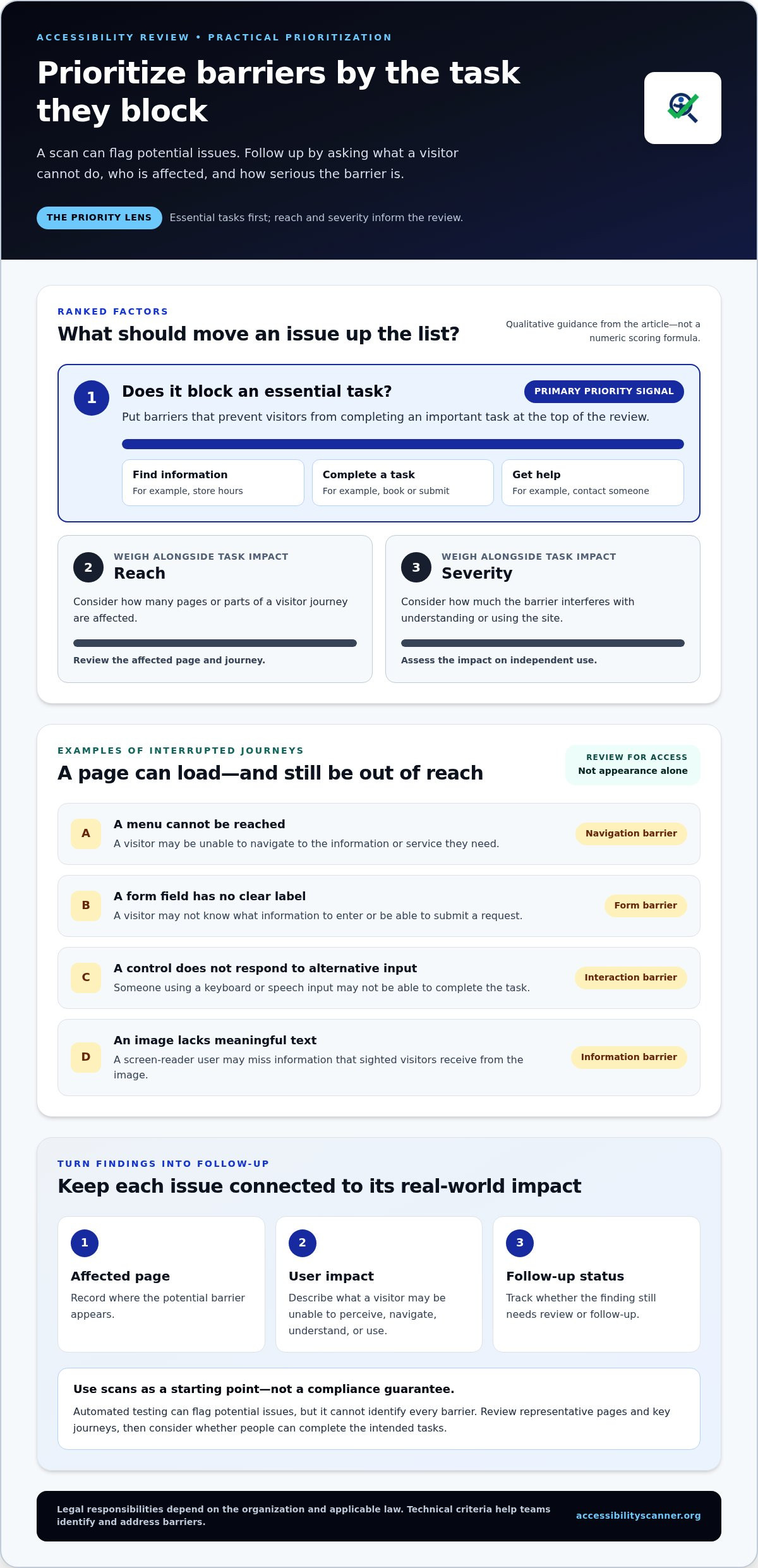
- Prioritize barriers that prevent visitors from completing essential tasks, while weighing each issue’s reach and severity.
What Americans with Disabilities Act website compliance means for access
Can visitors use your website to find information, complete a task, or contact you without encountering a barrier? That’s the practical question behind american with disabilities act website compliance. Website accessibility means designing and building digital content so people with disabilities can perceive, navigate, understand, and use it. That includes page structure, how controls respond to different input methods, and whether important information is available in an accessible format.
The ADA is a civil rights law, not a universal website checklist that specifies every technical requirement for every organization. The legal context depends in part on the organization and the services it provides. Technical guidance can help teams identify and address barriers, but it doesn’t replace understanding applicable legal responsibilities. For broader background, see this Web accessibility overview.
What does ADA website accessibility mean in practice?
In practice, people should be able to access essential information, services, transactions, and communication through a website. Consider a customer using a screen reader to find store hours, a keyboard instead of a mouse to complete a booking, or speech input to navigate a page. If a menu can’t be reached, a form field has no clear label, or a control doesn’t respond to alternative input, the visitor may be unable to complete the task independently.
These examples can help reveal where access breaks down. They don’t mean every website has identical legal obligations. The organization, its services, and the laws that apply all matter.
Why inaccessible web content matters to visitors
Accessible content supports independent use and equal participation. A form that can’t be operated with a keyboard may prevent someone from submitting a request. An image without meaningful text may leave a screen-reader user without information that sighted visitors get from the image. In both cases, the page is available, but an important part of its purpose is out of reach.
Small barriers can interrupt an entire journey. A person might find a service but be unable to book it, understand an instruction, or ask for help. That’s why an accessibility review should go beyond whether a page loads or looks complete. Ask whether people can understand its content and carry out its intended tasks.
Legal responsibility defines what an organization must address; technical accessibility criteria describe ways to identify and measure barriers. Keeping that distinction clear helps teams discuss the ADA and technical standards without treating them as interchangeable. It also keeps the focus on whether people can use the site.
How the ADA and WCAG relate to website accessibility
The ADA and WCAG are connected, but they aren’t interchangeable. The Americans with Disabilities Act establishes legal responsibilities. The Web Content Accessibility Guidelines (WCAG), developed by the World Wide Web Consortium, set technical success criteria that help teams identify and reduce digital barriers. In short: the ADA defines legal duties, while WCAG offers technical criteria for making web content more accessible.
That distinction matters for american with disabilities act website compliance. WCAG conformance can guide accessibility work, but it isn’t automatically a legal safe harbor. Whether an organization has obligations, and how they apply, depends on its circumstances and applicable law. The U.S. Department of Justice explains its broader position in its official DOJ guidance on web accessibility.
Is WCAG the same thing as ADA compliance?
No. WCAG turns accessibility goals into testable criteria for web content and functionality. The criteria address questions such as whether people can perceive content and operate controls in different ways. They give teams a shared technical reference for evaluating a site, but meeting a particular WCAG level doesn’t automatically answer every legal question.
A plain-English WCAG guidelines explainer can help clarify how the criteria are organized, but it isn’t a substitute for legal analysis. Keep the roles separate: use WCAG to guide technical review, and consider ADA responsibilities in the context of the organization and its services.
What changed for state and local government websites?
In 2024, the DOJ issued a Title II rule covering web content and mobile applications of state and local government entities. It adopts WCAG 2.1 Level AA as the technical standard for covered entities, subject to the rule’s scope and exceptions. The rule makes the technical benchmark more specific for public entities; it doesn’t make WCAG the ADA itself.
As of October 2026, the DOJ has extended the compliance deadline to April 26, 2027, for entities serving populations of 50,000 or more. Entities serving populations below 50,000 and special district governments have until April 26, 2028. Applicability can depend on the entity and the content or service at issue, so review current DOJ rule materials for details that apply to your organization.
For a technical starting point, a free automated accessibility scan can flag potential issues against ADA and WCAG criteria. Treat the results as leads for follow-up, not proof that every legal or access concern has been resolved.
Who may have ADA website responsibilities under Title II or Title III?
Start with the organization, not just the website. Title II applies to state and local government entities. Title III addresses businesses and other entities that are places of public accommodation. A website may be how people reach government information or access a business’s goods and services, so digital access can matter under either title.
That doesn’t mean every organization faces identical requirements. The applicable title, the organization’s services, the website or app, and any relevant exceptions all affect the analysis. For american with disabilities act website compliance, first identify the legal context that may apply, then review the requirements relevant to that organization.
How does Title II apply to state and local government web content?
In 2024, the Department of Justice issued a Title II rule covering web content and mobile apps provided by covered state and local government entities. The rule adopts WCAG 2.1 Level AA, subject to its scope and exceptions. Compliance timing also depends on the type and size of the entity. Review current DOJ materials to confirm applicability and deadlines rather than assuming one date applies to every public entity.
This rule gives covered public entities a defined technical standard. It doesn’t mean the same rule, timeline, or exceptions apply to every organization. Check the details before using a general summary to set a compliance plan.
How does Title III relate to businesses open to the public?
The DOJ’s web accessibility guidance also addresses businesses open to the public under Title III. The practical aim is equal access to goods, services, and information. A website that supports shopping, appointment booking, or customer communication can be an important route to those offerings.
Title III doesn’t have the same specific federal website technical standard as the Title II rule. That absence shouldn’t be read as proof that accessibility responsibilities don’t apply. The DOJ discusses website access in its guidance, and legal questions can depend on the business and circumstances. A general summary can’t determine an individual organization’s obligations.
For technical guidance, the W3C develops the Web Content Accessibility Guidelines (WCAG). These guidelines help teams identify and measure barriers, while the ADA provides the legal framework. Keep those roles distinct: use current DOJ materials to understand applicable requirements and WCAG as a practical reference for examining digital access.
How to identify website accessibility barriers without overtrusting a scan
A scan is a useful starting point, not a verdict. Use it to surface potential issues, then review how people move through important tasks. For a practical first pass, follow this sequence:
- Select key journeys. Choose tasks visitors need to complete, such as finding a service, submitting a request, or making a purchase.
- Scan representative pages. Include the pages and steps involved in those journeys, not just the homepage.
- Review each finding. Check whether the flagged issue is present, where it appears, and how it could affect a visitor.
- Prioritize follow-up. Address issues that block essential tasks before lower-impact items.
This process turns american with disabilities act website compliance from a broad concern into a focused review of potential barriers. For a separate legal-risk perspective, use the article’s ADA lawsuit-risk checklist alongside this accessibility review. It supports risk triage, while a scan focuses on detectable page issues.
Which accessibility barriers should a first review look for?
Check for images that lack useful text alternatives, text and backgrounds with low contrast, and form fields without clear labels. Then try completing key tasks using only a keyboard. Can you reach each control, tell where focus is, and move through the page in a logical order? Check whether navigation labels make sense and help visitors find their way. These are useful examples, not a complete audit or legal checklist.
What can an automated accessibility scan detect?
An automated scan checks page code and detectable patterns that may indicate accessibility issues. It can flag potential problems such as missing image alternatives, low contrast, or form labels that need review. Results still require interpretation: an image may need context-specific alternative text, and a label that is technically present may not clearly explain what a field requires.
Automation can’t reliably judge every user experience. It may miss confusing keyboard flow, unclear instructions, or barriers that depend on context and human judgment. A scan also isn’t manual testing, a fix to the underlying issue, or an assessment of legal obligations. Treat each result as a lead to investigate, not proof that the whole site is accessible or legally compliant.
Start with a focused sample, record what the scan flags, and follow up on issues that affect key tasks. Run a free automated accessibility scan to surface potential detectable issues on selected pages.
What to do after finding ADA website accessibility gaps
A finding matters only if it leads to a clear next step. Turn scan results and other observations into a working issue log, not a report that gets filed away. For each item, record the affected page or component, what a visitor may be unable to do, the apparent impact, who owns follow-up, and the current status.
This record helps teams distinguish a minor inconvenience from a barrier that stops someone completing an essential task. It also makes progress visible. After a change, retest the affected page and update its status rather than assuming the issue is resolved.
How should website owners prioritize accessibility findings?
Start with barriers that prevent visitors from completing important tasks, such as accessing a service or submitting a request. Then consider the issue’s reach. A problem repeated across many pages or a key journey may affect more visitors than an isolated issue. Weigh both reach and severity rather than prioritizing findings by scan order alone.
- Document: Note the page, issue, potential user impact, and date identified.
- Assign: Give each item an owner and a specific follow-up status.
- Retest: Check the affected page after a change and record whether the barrier remains.
Keep accessibility in the workflow after the initial review. Include it in design, development, and content updates so new pages and changes don’t reintroduce known barriers. This ongoing process is more useful than treating american with disabilities act website compliance as a one-time scan or pass-or-fail result.
How can a free accessibility scan support the next step?
A free automated scan can help surface potential ADA and WCAG issues on selected pages. Use its findings as inputs for your issue log, then review each result in context and decide how your organization will handle remediation. A scan can identify some detectable problems, but it doesn’t assess every user experience or replace legal analysis.
Scanning is a starting point, not legal advice or a guarantee of compliance. Keep that limit clear as you plan and track follow-up. For a quick first look at potential accessibility issues, scan a website for potential accessibility issues.
Turn accessibility findings into steady progress
Start with the legal context that applies to your organization, then use WCAG as a technical guide for identifying barriers. The ADA and WCAG serve different roles, and no automated scan can confirm that every visitor can use every part of your website.
Use scan results to build an actionable issue log. Record affected pages and user impact, prioritize barriers that block essential tasks, assign follow-up, and retest after changes. This practical process makes american with disabilities act website compliance less abstract and helps keep accessibility on the agenda as your site evolves.
A free automated scan can quickly flag potential ADA and WCAG issues on scanned pages. Treat the results as a starting point for review, not a compliance guarantee or legal advice. Run a free automated accessibility scan to take the first step. Each barrier you identify gives you a clearer opportunity to improve access, one focused step at a time.
Frequently Asked Questions
Does the ADA require websites to meet WCAG?
It depends on the organization and which ADA title applies. The 2024 Title II rule requires covered state and local government entities to meet WCAG 2.1 Level AA for covered web content and mobile apps, subject to the rule’s scope and exceptions. For private businesses under Title III, there’s no federally mandated technical website standard, but WCAG is commonly used as a practical benchmark. WCAG conformance doesn’t automatically resolve every legal question.
Is there one official ADA website compliance checklist?
No. The ADA doesn’t provide one universal technical checklist for every website and organization. Title II’s web rule gives covered public entities a specific WCAG 2.1 Level AA standard, while Title III doesn’t prescribe a single federal technical standard for private businesses’ websites. WCAG criteria can guide a technical review, but a checklist or scan result shouldn’t be treated as a complete legal assessment or a guarantee of accessibility.
Does Title III apply to business websites?
Title III applies to businesses and other entities that are places of public accommodation. The Department of Justice’s guidance addresses website access for businesses open to the public, with the aim of equal access to goods, services, and information. The precise application can depend on the business and circumstances. Don’t assume that the lack of a specific Title III website standard means accessibility can be ignored, or that a general answer settles your organization’s legal responsibilities.
What does the 2024 ADA Title II web accessibility rule require?
The 2024 rule requires covered state and local government entities to make covered web content and mobile apps conform to WCAG 2.1 Level AA, subject to defined scope provisions and exceptions. As of October 2026, the extended compliance date is April 26, 2027, for entities serving populations of 50,000 or more, and April 26, 2028, for smaller entities and special district governments. Review current DOJ materials for applicability details.
Can an automated scan prove that a website is ADA compliant?
No. An automated scan can quickly flag potential accessibility issues it detects on selected web pages, but it won’t identify every barrier or judge every user experience. It may miss confusing keyboard navigation, context-dependent content, or issues requiring human judgment. Use results as a starting point: review each finding, test important user journeys, and track follow-up. A scan doesn’t provide legal advice or guarantee ADA compliance.
What website accessibility barriers should I fix first?
Start with barriers that prevent visitors from completing essential tasks, such as accessing information, submitting a form, or using a service. Then consider severity and reach: a repeated issue across key pages may affect more user journeys than an isolated problem. Record the affected page, user impact, owner, and follow-up status. Retest after changes so the issue doesn’t remain unresolved in a report.
Does the ADA apply to every website in the United States?
Not in an identical way. ADA responsibilities depend on factors such as the organization, its services, the website or app, and the title or other applicable law involved. Title II covers state and local government entities, while Title III addresses businesses and other places of public accommodation. The absence of one universal technical standard for every website doesn’t establish that a particular site has no accessibility responsibilities.
How often should a website be checked for accessibility issues?
There isn’t one universal checking schedule that fits every website. Review accessibility when you add or change pages, forms, navigation, or other important features, and include checks in ongoing design and content workflows. Periodic scans can help surface detectable issues, but they won’t reveal every barrier. Revisit key user journeys, review scan findings, and retest pages after fixes to keep accessibility work active as the site changes.
Frequently Asked Questions
Does the ADA require websites to meet WCAG?
It depends on the organization and which ADA title applies. The 2024 Title II rule requires covered state and local government entities to meet WCAG 2.1 Level AA for covered web content and mobile apps, subject to the rule’s scope and exceptions. For private businesses under Title III, there’s no federally mandated technical website standard, but WCAG is commonly used as a practical benchmark. WCAG conformance doesn’t automatically resolve every legal question.
Is there one official ADA website compliance checklist?
No. The ADA doesn’t provide one universal technical checklist for every website and organization. Title II’s web rule gives covered public entities a specific WCAG 2.1 Level AA standard, while Title III doesn’t prescribe a single federal technical standard for private businesses’ websites. WCAG criteria can guide a technical review, but a checklist or scan result shouldn’t be treated as a complete legal assessment or a guarantee of accessibility.
Does Title III apply to business websites?
Title III applies to businesses and other entities that are places of public accommodation. The Department of Justice’s guidance addresses website access for businesses open to the public, with the aim of equal access to goods, services, and information. The precise application can depend on the business and circumstances. Don’t assume that the lack of a specific Title III website standard means accessibility can be ignored, or that a general answer settles your organization’s legal responsibilities.
What does the 2024 ADA Title II web accessibility rule require?
The 2024 rule requires covered state and local government entities to make covered web content and mobile apps conform to WCAG 2.1 Level AA, subject to defined scope provisions and exceptions. As of October 2026, the extended compliance date is April 26, 2027, for entities serving populations of 50,000 or more, and April 26, 2028, for smaller entities and special district governments. Review current DOJ materials for applicability details.
Can an automated scan prove that a website is ADA compliant?
No. An automated scan can quickly flag potential accessibility issues it detects on selected web pages, but it won’t identify every barrier or judge every user experience. It may miss confusing keyboard navigation, context-dependent content, or issues requiring human judgment. Use results as a starting point: review each finding, test important user journeys, and track follow-up. A scan doesn’t provide legal advice or guarantee ADA compliance.
What website accessibility barriers should I fix first?
Start with barriers that prevent visitors from completing essential tasks, such as accessing information, submitting a form, or using a service. Then consider severity and reach: a repeated issue across key pages may affect more user journeys than an isolated problem. Record the affected page, user impact, owner, and follow-up status. Retest after changes so the issue doesn’t remain unresolved in a report.
Does the ADA apply to every website in the United States?
Not in an identical way. ADA responsibilities depend on factors such as the organization, its services, the website or app, and the title or other applicable law involved. Title II covers state and local government entities, while Title III addresses businesses and other places of public accommodation. The absence of one universal technical standard for every website doesn’t establish that a particular site has no accessibility responsibilities.
How often should a website be checked for accessibility issues?
There isn’t one universal checking schedule that fits every website. Review accessibility when you add or change pages, forms, navigation, or other important features, and include checks in ongoing design and content workflows. Periodic scans can help surface detectable issues, but they won’t reveal every barrier. Revisit key user journeys, review scan findings, and retest pages after fixes to keep accessibility work active as the site changes.
Related guides

ADA Guidelines for Websites: A Clear 2026 Overview
What if “ADA compliant” isn’t a single website checklist? That’s the question behind many searches for ada guidelines. The answer depends partly on…
Read: ADA Guidelines for Websites: A Clear 2026 Overview
ADA Website Compliance Test: A Practical Checklist for 2026
What should an ada website compliance test actually tell you? A clean scan can feel reassuring, but automated tools only flag issues they can detect….
Read: ADA Website Compliance Test: A Practical Checklist for 2026
ADA Title III Website Checker: How to Evaluate the Right Tool in 2026
Can an automated scan tell you whether your business website meets ADA Title III expectations? An ada title iii website checker can flag potential…
Read: ADA Title III Website Checker: How to Evaluate the Right Tool in 2026