Accessibility Compliance for E-Commerce Sites: The 2026 Audit Checklist
Can a customer complete a checkout on your storefront using only a keyboard? With online retailers targeted in 79% of all federal ADA digital…

Can a customer complete a checkout on your storefront using only a keyboard? With online retailers targeted in 79% of all federal ADA digital lawsuits in early 2026, accessibility compliance for e-commerce sites is no longer a design preference. It is urgent operational risk management centered directly on your checkout funnel.
You probably worry that meeting modern standards requires dismantling your entire store or deciphering dense WCAG specifications line by line. Falling behind on dynamic cart requirements while bracing for an unexpected ADA Title III demand letter is an exhausting position. Fortunately, achieving defensible accessibility does not demand a costly, ground-up rebuild.
By auditing your online store against current ADA and WCAG benchmarks, you can systematically eliminate checkout friction and legal liability. This 2026 checklist outlines the highest-risk storefront barriers, demonstrates how to run an immediate baseline scan, and provides a repeatable workflow to safeguard your checkout experience.
Key Takeaways
- Explore why accessibility compliance for e-commerce sites is critical for defending transactional funnels and reducing commercial exposure.
- Unpack the difference between WCAG 2.1 and WCAG 2.2 Level AA benchmarks across dynamic carts, variant selectors, and forms.
- Follow an operational audit checklist designed to pinpoint high-risk storefront barriers from product pages through order confirmation.
- Deploy a free web accessibility checker as an immediate baseline triage to uncover detectable code failures before shoppers encounter them.
- Establish an ongoing internal verification workflow that protects your revenue without relying on superficial overlay widgets.
Why Accessibility Compliance for E-Commerce Sites Is an Urgent Operational Priority
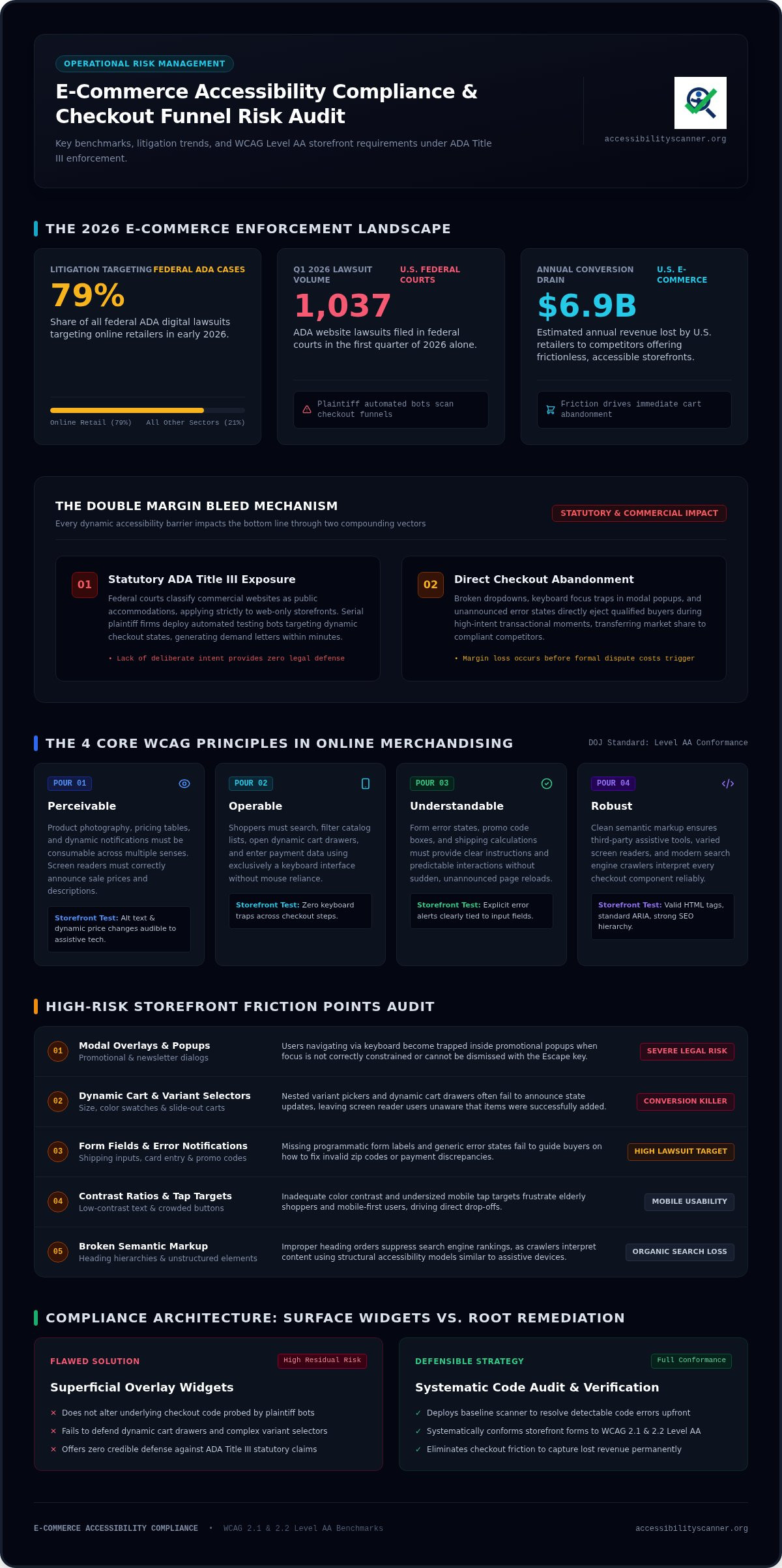
Is your checkout flow actively turning away paying buyers? In retail, accessibility compliance for e-commerce sites is not a theoretical IT checkbox. It is direct liability management. With 1,037 ADA website lawsuits filed in federal courts during the first quarter of 2026 alone, retail websites face unprecedented legal scrutiny. Plaintiff firms continuously deploy automated testing bots across online stores, specifically probing checkout flows, form fields, and navigation menus for immediate statutory violations.
Every digital barrier in your store burns margin twice. First, it invites formal legal scrutiny; second, it forces qualified shoppers to abandon their carts. U.S. e-commerce retailers lose an estimated $6.9 billion annually to competitors offering frictionless, accessible storefronts. A proactive compliance triage stops this revenue bleed before it triggers formal dispute costs.
The Legal Reality of ADA Title III in Digital Retail
Federal courts consistently classify commercial websites as places of public accommodation under Title III of the Americans with Disabilities Act. This standard applies directly to web-only brands with no physical footprint. Lack of deliberate intent provides zero legal defense against statutory exposure. Serial plaintiff firms specifically target transactional pathways, documenting broken dropdowns, inaccessible form error alerts, and unannounced checkout states to draft demand letters within minutes.
The Hidden Commercial Impact: Lost Conversions and Damaged Trust
Beyond courtroom liability, transactional friction erodes brand equity. Broad principles of Web accessibility dictate that every visitor must perceive, understand, navigate, and interact with your store seamlessly. When dynamic elements fail this standard, conversion rates plummet across high-value touchpoints:
- Trapped keyboard shoppers: Modal overlays, promotional popups, and nested variant selectors often trap users who navigate without a mouse, preventing them from completing transactions.
- Mobile and elderly friction: Inadequate contrast ratios and undersized tap targets alienate aging shoppers and mobile-first buyers who struggle with crowded mobile layouts.
- Degraded search visibility: Search engines crawl websites in ways similar to assistive technology; poor semantic markup and broken heading hierarchies suppress your organic product rankings.
Accessibility compliance for e-commerce sites protects your baseline revenue. When you systematically resolve checkout barriers, you eliminate statutory targets while smoothing the purchase pathway for all qualified shoppers.
Core Standards Explained: ADA Title III and WCAG 2.2 Requirements
What technical standard actually shields your store from statutory claims? While Title III of the ADA lacks codified technical metrics for commercial retail, the Department of Justice explicitly references the Web Content Accessibility Guidelines (WCAG) Level AA in settlements. The official Guidance on Web Accessibility and the ADA affirms that businesses must ensure their web goods and services are accessible to people with disabilities. Achieving legal accessibility compliance for e-commerce sites requires meeting WCAG conformance, meaning your site satisfies the published success criteria across all dynamic transactional workflows.
Deconstructing WCAG Principles for Online Merchandising
WCAG organizes technical standards around four core principles. Applying these to an online store requires translating abstract rules into storefront mechanics:
- Perceivable: All product photography, pricing tables, and dynamic notifications must be consumable through multiple senses. If a screen reader cannot announce your sale price or image description, the content fails.
- Operable: Shoppers must be able to search, filter catalog lists, open dynamic carts, and enter credit card information using exclusively a keyboard interface.
- Understandable: Form error states, promo code boxes, and shipping calculations must provide clear instructions and predictable interactions without unexpected page reloads.
- Robust: Store code must use clean semantic markup so third-party assistive tools, varying screen readers, and diverse modern browsers interpret page components reliably.
Critical WCAG 2.2 Updates Relevant to E-Commerce Stores
Published in late 2023, WCAG 2.2 serves as the benchmark for legally defensible websites. It introduces specific criteria that target interactive, mobile-heavy shopping journeys:
- Target Size Minimum (Success Criterion 2.5.8): Interactive elements, including variant swatches, quantity steppers, and cart removal icons, must maintain a minimum target area of 24 by 24 CSS pixels. Crowded buttons cause accidental taps and abandonments.
- Accessible Authentication (Success Criterion 3.3.8): Login flows cannot rely on cognitive function tests such as complex puzzles, CAPTCHA transcriptions, or memorization prompts. Shoppers must be able to paste credentials or use standard password managers.
- Dragging Movements (Success Criterion 2.5.7): Any feature requiring a drag gesture, like interactive price filters or product image carousels, must offer a single-pointer alternative like tapping a button or slider track.
Checking every template against these modern requirements can feel daunting. Running an instant evaluation with a free web accessibility checker quickly identifies exposed code patterns across your core templates, giving you an immediate technical baseline.
The Complete E-Commerce Accessibility Compliance Checklist
Where do online storefronts actually break? Achieving true accessibility compliance for e-commerce sites requires inspecting dynamic touchpoints across your entire sales funnel. Real compliance lives inside interactive templates where shoppers browse, configure, and pay. Grounded in the official Web Content Accessibility Guidelines (WCAG) 2.2, this checklist focuses on the storefront components carry the highest legal and commercial risk.
Product Catalog, Media, and Navigation Checklist
Catalog browsing represents the first point of friction for assistive tech users. Audit these foundational assets:
- Product alternative text: Provide concise descriptions of cut, color, and material for every product image. Mark decorative banners and aesthetic background graphics with
aria-hidden="true". - Faceted navigation: Ensure category flyouts, price sliders, and collection filters are fully operable via Tab, Enter, and arrow keys without cursor reliance.
- Contrast integrity: Verify that slashed original prices, inventory badges, and promotional banners maintain at least a 4.5:1 contrast ratio against their backdrops.
Product Detail Page (PDP) and Cart Interaction Checklist
Product detail pages host dynamic scripts that frequently conceal state changes from screen readers. Verify these interactive elements:
- Variant swatches: Program swatch selectors with explicit
aria-checkedoraria-selectedattributes so non-sighted shoppers know which size or color is currently active. - Live inventory announcements: Pair stock alerts and add-to-cart notifications with
aria-live="polite"regions so screen readers announce cart updates without reloading the page. - Slide-out mini-carts: Ensure slide-out drawers trap keyboard focus while active, allow immediate dismissal with the Escape key, and restore focus to the cart trigger button upon closing.
Checkout Flows, Form Inputs, and Transactional Modals
The checkout funnel is the primary target for serial litigation. Friction here directly costs you completed orders:
- Explicit input labels: Attach visible
<label>tags to every billing, shipping, and credit card field. Placeholder text that disappears during input violates compliance standards. - Session limits: Eliminate rigid countdown timers during checkout, or give buyers an accessible control to extend their session before losing their cart data.
- Inline error guidance: Program error validation to identify the specific field, explain the input failure in plain text, and shift focus directly to the issue.
- Third-party widgets: Confirm customer service chatbots and review carousels do not create keyboard traps that lock users out of final submission buttons.
How to Audit Your Online Store and Prioritize Critical Violations
How do you begin fixing hundreds of storefront templates without halting daily operations? Remediation does not require an immediate code overhaul from scratch. Instead, it demands structured triage: identify automated failures, validate transactional paths by hand, and fix high-liability blockers first. Establishing consistent accessibility compliance for e-commerce sites comes down to executing five sequential stages.
- Scan your primary layouts: Deploy an automated tool across your homepage, top category templates, product detail pages, and cart layouts to expose repeated theme-level violations.
- Perform keyboard-only runs: Manually navigate your purchase funnel without touching a mouse to surface functional traps.
- Score operational risk: Group flagged barriers by how directly they prevent a customer from finalizing an order.
- Patch transactional blockers: Resolve checkout inputs, modal close handlers, and variant selectors before touching cosmetic elements.
- Publish an accessibility statement: Detail your ongoing compliance efforts, technical benchmarks, and contact channels for shoppers requesting assistance.
Establishing an Immediate Automated Baseline
Start at the template level. Online stores share standardized layouts, meaning a single template bug can multiply into thousands of detectable errors across your catalog. Automated tools instantly surface low-contrast pricing text, unlinked form fields, missing image alt text, and broken heading sequences. To quickly pinpoint your store’s baseline exposure, run an automated scan with an accessibility checker to reveal systemic template vulnerabilities in seconds.
Conducting Manual Keyboard and Screen Reader Validation
Automation catches detectable code errors, but manual interaction uncovers dynamic barriers. Put your mouse away. Use the Tab key, Shift+Tab, Enter, Space, and directional arrows to navigate from a product card directly through payment submission. Look for these specific interaction breaks:
- Missing focus rings: If you cannot visibly track which button, link, or input currently holds focus, shoppers using keyboards are navigating blind.
- Popup traps: Trigger your newsletter or exit-intent modals; if the Escape key fails to dismiss them, or focus wanders behind the overlay, you have found a major liability.
- Dynamic cart freezes: Open your mini-cart drawer to verify that keyboard focus moves inside immediately rather than tabbing uselessly through obscured background content.
The Triage Hierarchy: What to Fix First
Never treat all compliance defects equally. Fix issues that block purchases first. An unlabelled credit card field or trapped checkout modal creates immediate legal vulnerability and cart abandonment. Address global header navigation and collection filters next so buyers can locate inventory. Save minor contrast mismatches on secondary blog footers and non-essential icon styling for scheduled development sprints later.
Building a Sustainable Compliance Strategy for Digital Retailers
Can a single software plugin permanently solve your accessibility risk? Many merchants hope so, but installing a quick fix rarely survives contact with reality. Sustainable accessibility compliance for e-commerce sites requires an active operational habit rather than a set-and-forget widget. Every time your marketing team launches a promotional campaign, installs an upsell app, or imports new inventory, your codebase shifts. Maintaining compliance requires continuous vigilance built into your standard publishing cycle.
The Critical Flaws of Quick-Fix Accessibility Overlays
Third-party overlay widgets promise instant immunity with a single snippet of JavaScript. The legal and practical reality tells a different story. Over 25% of companies sued for digital accessibility violations in 2026 had an accessibility widget installed on their storefront. Federal courts consistently reject overlays because they do not repair broken underlying source code. Instead, these toolbars often clash directly with personal screen readers and custom assistive hardware, frustrating users. Genuine defense demands semantic HTML, proper ARIA attributes, and clean code baked directly into your store theme.
Embedding Automated Scanning into Ongoing Merchandising
E-commerce catalogs change constantly. To keep your storefront defensible without slowing down sales, build automated checks directly into your regular merchandising cycle:
- Pre-launch vetting: Audit third-party apps, checkout customizers, and theme modifications in staging environments before publishing them live.
- Content standards: Train your merchandising staff to input meaningful image descriptions and avoid baking promotional text into flat product graphics.
- Routine scans: Schedule recurring scans to catch syntax regressions, broken form elements, and contrast issues introduced by day-to-day catalog updates.
- Accessibility statement: Post a clear public statement detailing your target compliance benchmarks, active remediation efforts, and a dedicated communication channel for customer feedback.
Proactive monitoring prevents sudden liability, turning accessibility compliance for e-commerce sites into a seamless operational standard that protects both your customers and your bottom line.
Secure Your Checkout Funnel and Eliminate Digital Risk
Protecting your online retail revenue comes down to systematically resolving checkout friction and adhering to current WCAG benchmarks. Quick fixes like overlay widgets won’t insulate your business from legal exposure; genuine code integrity will. Achieving sustainable accessibility compliance for e-commerce sites is completely manageable when you triage storefront vulnerabilities in order of transactional impact.
You don’t need to guess where your templates fall short. Take the first proactive step by establishing an immediate baseline across your primary shopping layouts. Run a free automated accessibility scan to detect high-risk WCAG and ADA compliance violations across your catalog, product detail pages, and checkout elements in seconds. With clear visibility into your store’s underlying code, you can eliminate high-liability barriers, safeguard your margins, and deliver a dependable shopping experience for every customer.
Frequently Asked Questions
Does the Americans with Disabilities Act (ADA) apply to all e-commerce websites?
Yes, federal courts consistently interpret commercial storefronts as places of public accommodation under Title III of the ADA. This obligation applies to online-only retail stores without physical brick-and-mortar locations. Regardless of company revenue or inventory size, online merchants must provide equal access to their goods, digital services, and checkout experiences for individuals navigating with disabilities.
What is the difference between WCAG 2.1 and WCAG 2.2 for online stores?
While WCAG 2.1 Level AA remains the common statutory reference point in federal litigation, WCAG 2.2 establishes the current best practice for retail storefronts. The updated 2.2 standard introduces strict criteria directly affecting dynamic shopping experiences. These include minimum target sizes for mobile touch buttons, simplified authentication methods that remove cognitive tests during customer logins, and dragging movement alternatives for interactive product sliders.
Can an e-commerce website become compliant using an accessibility overlay or widget?
No, installing an overlay or widget will not achieve genuine accessibility compliance for e-commerce sites. Federal courts routinely reject automated overlay toolbars because they do not modify the underlying theme source code. Furthermore, these widgets regularly interfere with personal screen readers and assistive devices, leaving merchants vulnerable to statutory demand letters despite having paid for a quick-fix widget subscription.
What are the most common e-commerce accessibility violations that trigger lawsuits?
Serial plaintiff firms focus heavily on interactive barriers within shopping flows. High-frequency violations include missing image alternative text on catalog items, unlabeled form fields across shipping and billing pages, and poor visual contrast on promotional prices. Keyboard traps inside exit-intent popups, dynamic slide-out cart drawers, and custom dropdown menus represent another major cluster of targets that lead directly to litigation.
How often should an e-commerce brand test its website for accessibility compliance?
Online retailers should audit their websites continuously whenever modifying storefront code. High-growth stores deploy new landing pages, adjust merchandising assets, and install third-party apps on a weekly basis. Running automated scans before major sales events, alongside scheduled quarterly evaluations across core templates, helps teams catch newly introduced code regressions before shoppers or legal bots detect them.
Does automated accessibility scanning catch 100% of website accessibility errors?
No automated tool can detect every potential accessibility barrier. Automated scanners instantly catch high-volume syntax violations like broken ARIA roles, missing labels, contrast failures, and improper document heading structures across thousands of URLs. However, dynamic interactive flows, keyboard navigation logic, and the contextual clarity of product descriptions still require practical validation by testing workflows directly.
What should an e-commerce merchant do immediately upon receiving an ADA demand letter?
Do not ignore the notice or rush to install a superficial overlay widget. Start by documenting the exact allegations and URLs cited in the letter. Next, run an automated scan across the disputed pages to isolate the detectable code errors. You should then consult qualified legal counsel specializing in digital accessibility defense to structure a clear remediation roadmap and formal response.
Frequently Asked Questions
Does the Americans with Disabilities Act (ADA) apply to all e-commerce websites?
Yes, federal courts consistently interpret commercial storefronts as places of public accommodation under Title III of the ADA. This obligation applies to online-only retail stores without physical brick-and-mortar locations. Regardless of company revenue or inventory size, online merchants must provide equal access to their goods, digital services, and checkout experiences for individuals navigating with disabilities.
What is the difference between WCAG 2.1 and WCAG 2.2 for online stores?
While WCAG 2.1 Level AA remains the common statutory reference point in federal litigation, WCAG 2.2 establishes the current best practice for retail storefronts. The updated 2.2 standard introduces strict criteria directly affecting dynamic shopping experiences. These include minimum target sizes for mobile touch buttons, simplified authentication methods that remove cognitive tests during customer logins, and dragging movement alternatives for interactive product sliders.
Can an e-commerce website become compliant using an accessibility overlay or widget?
No, installing an overlay or widget will not achieve genuine accessibility compliance for e-commerce sites. Federal courts routinely reject automated overlay toolbars because they do not modify the underlying theme source code. Furthermore, these widgets regularly interfere with personal screen readers and assistive devices, leaving merchants vulnerable to statutory demand letters despite having paid for a quick-fix widget subscription.
What are the most common e-commerce accessibility violations that trigger lawsuits?
Serial plaintiff firms focus heavily on interactive barriers within shopping flows. High-frequency violations include missing image alternative text on catalog items, unlabeled form fields across shipping and billing pages, and poor visual contrast on promotional prices. Keyboard traps inside exit-intent popups, dynamic slide-out cart drawers, and custom dropdown menus represent another major cluster of targets that lead directly to litigation.
How often should an e-commerce brand test its website for accessibility compliance?
Online retailers should audit their websites continuously whenever modifying storefront code. High-growth stores deploy new landing pages, adjust merchandising assets, and install third-party apps on a weekly basis. Running automated scans before major sales events, alongside scheduled quarterly evaluations across core templates, helps teams catch newly introduced code regressions before shoppers or legal bots detect them.
Does automated accessibility scanning catch 100% of website accessibility errors?
No automated tool can detect every potential accessibility barrier. Automated scanners instantly catch high-volume syntax violations like broken ARIA roles, missing labels, contrast failures, and improper document heading structures across thousands of URLs. However, dynamic interactive flows, keyboard navigation logic, and the contextual clarity of product descriptions still require practical validation by testing workflows directly.
What should an e-commerce merchant do immediately upon receiving an ADA demand letter?
Do not ignore the notice or rush to install a superficial overlay widget. Start by documenting the exact allegations and URLs cited in the letter. Next, run an automated scan across the disputed pages to isolate the detectable code errors. You should then consult qualified legal counsel specializing in digital accessibility defense to structure a clear remediation roadmap and formal response.
Related guides

WCAG Guidelines in Plain English: Principles, Levels, and Practical Meaning
What if treating accessibility as a pass-or-fail checklist leaves the biggest barriers untouched? The wcag guidelines can feel like a maze of…
Read: WCAG Guidelines in Plain English: Principles, Levels, and Practical Meaning
Wix Website ADA Compliance Check: A Practical Guide for 2026
What if an accessibility scan looks clean but your Wix site still has barriers? Automated tools can flag common issues, but they can’t judge every…
Read: Wix Website ADA Compliance Check: A Practical Guide for 2026
WCAG Compliance Scanner: How to Choose the Right Tool
What if a clean scan gives you confidence while users still face barriers? A wcag compliance scanner can flag common issues, but an automated result…
Read: WCAG Compliance Scanner: How to Choose the Right Tool