Is My Website ADA Compliant? How to Test Your Risk in 2026
Could an unexpected legal demand letter hit your inbox tomorrow because of code you didn’t write? For most operators, asking “is my website ada…

Could an unexpected legal demand letter hit your inbox tomorrow because of code you didn’t write? For most operators, asking “is my website ada compliant?” happens only after a competitor faces legal action or an aggressive firm targets their checkout flow. It’s an unnerving position. You want to protect your organization and serve every visitor, but conflicting advice and dense technical jargon make digital accessibility feel like an impenetrable minefield.
You don’t need a developer background or deep coding expertise to take command of your operational exposure. You’ll discover how to evaluate your site against the WCAG 2.1 Level AA benchmarks favored by U.S. courts, instantly spot high-risk accessibility barriers, and establish an accurate baseline of your digital risk. We will break down the current legal climate, clarify what automated scanning can and cannot catch, and provide a clear triage checklist to remediate your top liability triggers.
Key Takeaways
- Understand why U.S. courts and federal regulators treat WCAG 2.1 Level AA as the baseline standard for ADA Title III compliance.
- Stop wondering “is my website ada compliant?” and run an automated accessibility checker to surface urgent technical liabilities immediately.
- Recognize how automated scanners deliver critical diagnostic triage for obvious digital barriers while maintaining a clear view of your overall risk profile.
- Target the highest-risk litigation triggers first, focusing technical remediation on missing form labels, absent alternative text, and broken keyboard navigation.
What Does It Mean for a Website to Be ADA Compliant?
What does it actually mean to run an accessible site? At its core, digital compliance requires an online interface that disabled visitors can navigate, understand, and use without obstruction. When operators audit their digital properties and ask, “is my website ada compliant?” they are checking for invisible friction. True digital compliance separates aspirational design ideals from non-negotiable legal requirements. Broad concepts of web accessibility aim to optimize overall user satisfaction, but statutory compliance targets concrete exclusion. If your code blocks assistive tools, the consequences escalate rapidly from unsolicited legal demand letters to expensive federal litigation under civil rights statutes.
The Americans with Disabilities Act and Title III
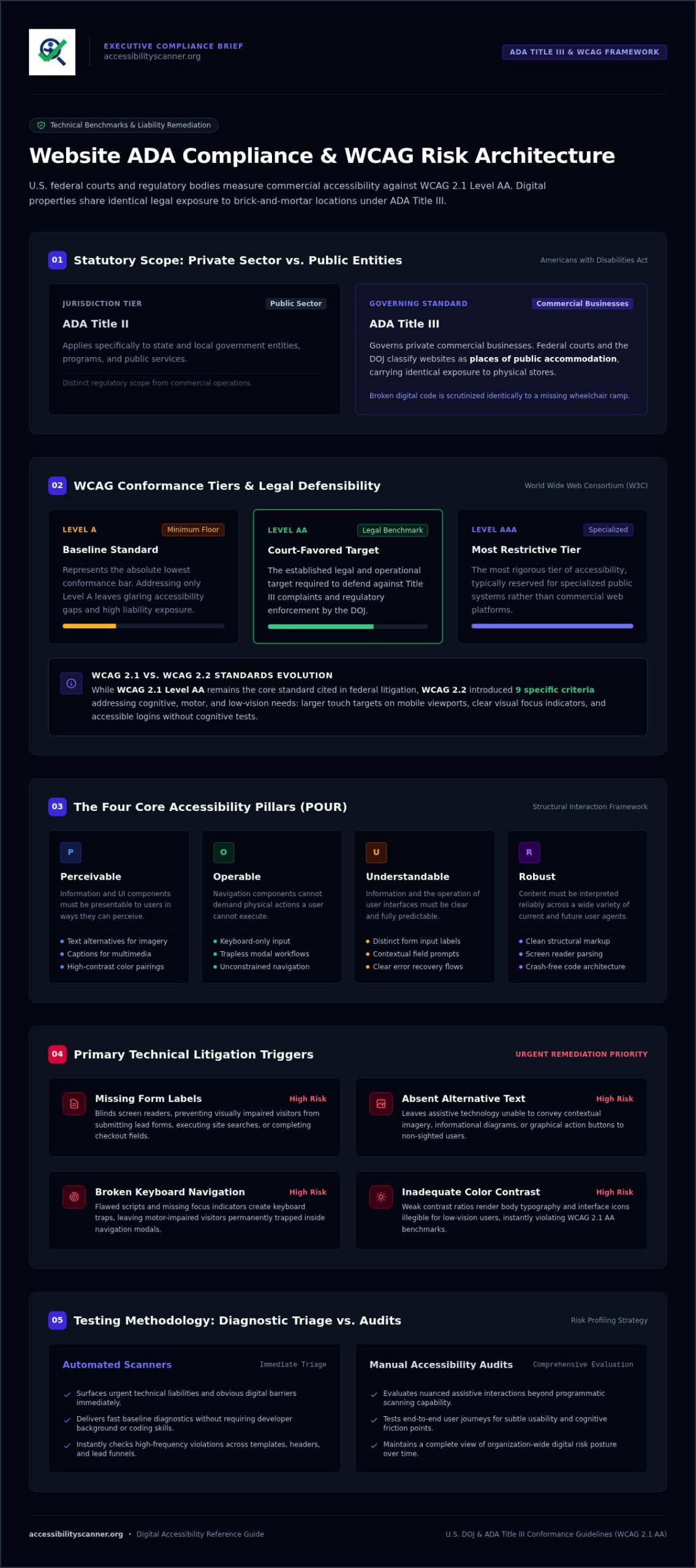
Compliance guides often blur the line between public entity rules and private sector obligations. Title II applies specifically to state and local governments, but Title III governs private commercial businesses. Federal courts and the Department of Justice treat commercial websites as places of public accommodation. Purely digital stores and physical brick-and-mortar storefronts share identical legal exposure under the law. Before asking yourself again, “is my website ada compliant?” you must understand these statutory ground rules. If a visitor using assistive technology cannot complete a purchase, submit an inquiry, or review service terms, you face actionable non-compliance. Regulators treat broken markup with the same scrutiny as a physical staircase blocking a wheelchair ramp.
Why Traditional Websites Accidentally Block Users
Few businesses exclude visitors on purpose. Severe digital barriers almost always stem from overlooked front-end development updates. A missing form label blinds screen readers, preventing visually impaired visitors from submitting lead forms or completing checkout fields. Inadequate color contrast makes body text illegible for individuals with low vision. Flawed scripts create keyboard traps, leaving users who cannot operate a mouse permanently stuck inside navigation modals. These technical failures cause direct commercial harm. Beyond sparking sudden legal exposure, inaccessible code turns away high-intent buyers, instantly surrendering valuable market share to accessible competitors.
The Technical Benchmarks: WCAG Standards Explained
How do courts measure accessibility when the statutory text contains no technical specifications? They rely on the Web Content Accessibility Guidelines (WCAG) established by the World Wide Web Consortium. Federal judges and regulatory agencies consistently treat WCAG 2.1 Level AA as the governing standard for Title III scrutiny. In its published Guidance on Web Accessibility and the ADA, the Department of Justice affirms that digital barriers violate federal nondiscrimination laws. Conformance is divided into three distinct tiers:
- Level A: The absolute minimum floor. Addressing only Level A leaves glaring accessibility gaps.
- Level AA: The established legal and operational target required to defend against litigation.
- Level AAA: The most restrictive tier, typically reserved for specialized public systems.
If you are evaluating whether your digital storefront is exposed, asking “is my website ada compliant” means measuring your templates directly against Level AA criteria.
WCAG 2.1 vs. WCAG 2.2: What Website Owners Must Know
While WCAG 2.1 Level AA remains the core metric cited in Title III complaints, WCAG 2.2 expanded the standard by adding nine specific criteria. These updates target critical friction points for users with cognitive, motor, and low-vision challenges. They require larger touch targets on mobile viewports, clear visual focus indicators for interactive elements, and accessible login mechanisms that do not rely on cognitive tests. Aiming for WCAG 2.2 strengthens your long-term position, but remediating baseline 2.1 AA failures eliminates your most pressing operational risk.
The Four Core Accessibility Principles (POUR)
Every WCAG success criterion falls under four structural pillars that govern how humans interact with software:
- Perceivable: Users must be able to comprehend presented information. This mandates proper text alternatives for imagery, captions for multimedia, and high-contrast color pairings.
- Operable: Navigation components cannot demand physical actions a user cannot execute. Every workflow, modal, and control must function via keyboard-only input.
- Understandable: Interfaces must behave predictably. Form inputs need distinct instructions, contextual prompts, and clear error recovery.
- Robust: Code must parse cleanly across diverse user agents. Clean markup ensures screen readers interpret site architecture without crashing.
You do not need to decipher raw technical documentation to begin an audit. Run your domain through an automated accessibility checker to immediately isolate front-end code that violates these POUR standards.
How to Test If Your Website Is ADA Compliant
How do you determine actual exposure without retaining expensive outside consultants? Assessing digital compliance requires an orderly diagnostic approach. You don’t need proprietary development toolkits or an engineering degree to run an initial verification. When leadership asks, “is my website ada compliant?” you need clear facts rather than guesswork. Follow a structured, multi-tier inspection routine that moves methodically from instant automated detection to straightforward interface spot-checks. This diagnostic framework gives your internal team immediate visibility over existing liabilities.
Step 1: Run an Automated Accessibility Scan
Begin with a zero-friction algorithmic scan. An automated scanner parses your Document Object Model (DOM) tree in seconds, comparing your published code against technical criteria in the Web Content Accessibility Guidelines (WCAG). Automated testing swiftly pinpoints syntax errors, unlabelled input fields, missing image alt attributes, and insufficient visual color contrast ratios. Because aggressive law firms deploy scripts to detect these exact programmatic failures across thousands of domains at once, running an automated scan acts as your vital first line of defense, establishing an immediate risk baseline across key landing pages.
Step 2: Conduct Basic Keyboard-Only Navigation Checks
Next, put your mouse aside. Press the Tab key repeatedly to navigate through your site header, primary menu, search bars, and checkout paths. Can you see where the cursor lands? Every interactive link, button, and input must display a crisp, visible focus outline. Verify that your tab sequence follows a logical visual reading order rather than jumping erratically across page regions. Test your site for keyboard traps: open dialogs, cart overlays, and flyout menus, ensuring you can dismiss each component cleanly with the Escape key without locking page focus.
Step 3: Audit Interactive Forms and Media Assets
Examine your conversion funnels and rich media. Inspect contact forms to confirm input fields, dropdown menus, and checkboxes possess explicit programmatic labels. Relying solely on placeholder text fails because screen readers often skip unlabelled inputs, and the visual text vanishes once typing begins. Test video players to ensure they feature synchronized closed captions and keyboard-operable controls. Finally, submit a form with missing information; verify that error alerts provide specific instructions so screen reader software announces the failure clearly. Document all diagnostic findings in an internal remediation log to guide developer fixes efficiently.
Automated Scanners vs. Manual Audits: Understanding the Real Differences
Can an automated tool deliver complete legal immunity? No software can make that claim. Yet some compliance agencies dismiss automated testing entirely, pushing expensive human inspection retainers instead. That stance ignores reality. Digital triage requires immediate velocity. When checking “is my website ada compliant” under strict operational deadlines, automated scanners offer the fastest method to detect the specific, objective code failures that plaintiff firms systematically target. Understanding where automated verification excels, and where human interpretation takes over, lets you deploy your engineering resources effectively.
What Automated Accessibility Checkers Excel at Catching
Automated diagnostic software performs mathematical, rule-based audits across your entire DOM structure in seconds. It instantly flags objective, high-liability violations, including:
- Contrast calculation failures: Identifying precise color ratio deficits between text elements and background containers.
- Missing alternative attributes: Catching graphic assets that lack raw
alttags entirely. - Broken ARIA roles: Detecting invalid states, orphaned properties, and syntax errors that confuse screen readers.
- Empty action tags: Flagging unlabelled links, icons, and buttons that leave screen reader users without context.
- Structural heading defects: Surfacing skipped heading levels that disrupt document outlining.
Where Manual Human Judgment Remains Necessary
Algorithms verify code rules; humans evaluate context. An automated script detects whether an image possesses alternative text, but it cannot judge whether that description accurately communicates the image’s context within an article. Similarly, automated tools confirm whether a modal window can receive focus, but evaluating complex swipe gestures inside single-page applications or verifying nuanced reading orders across responsive layouts still requires human verification. Manual review confirms subjective user comprehension, while automated scans eradicate the glaring technical omissions that invite legal scrutiny.
Treat automated testing as your essential first-line diagnostic scan. To baseline your organizational risk right now, run our free web accessibility checker and isolate your immediate liabilities before they escalate.
How to Prioritize and Fix High-Risk Accessibility Violations
Where should your remediation begin? Facing a long list of automated diagnostic flags feels overwhelming. Third-party script overlays promise instant repair, but courts reject superficial visual widgets that leave underlying source code broken. Do not gamble your organization’s legal standing on quick fixes. Instead, execute a disciplined triage plan that targets high-exposure operational barriers first. When stakeholders ask, “is my website ada compliant?” your remediation log should demonstrate methodical progress against primary liability triggers.
Triage Priority: The Top 4 Lawsuit Triggers
Litigation firms deploy automated crawlers to harvest sites with easily provable technical defects. Direct your developers to eliminate these four critical vulnerabilities immediately:
- Unlabelled form controls: Attach explicit
<label for="">attributes to every input field, selector, and submission button within checkout funnels and contact forms. - Functional image alternative text: Supply clear descriptive text for image links, social icons, and interactive visual buttons so screen readers communicate their destination.
- Missing keyboard focus rings: Remove CSS rules like
outline: nonethat strip focus states, ensuring keyboard navigators can track their location across interactive links. - Global color contrast deficits: Update shared CSS stylesheets to guarantee body copy and call-to-action buttons satisfy the minimum 4.5:1 contrast threshold.
Building an Ongoing Accessibility Auditing Routine
Digital compliance is never a one-time project. Every marketing campaign update, third-party plugin installation, or theme refactor can introduce fresh technical barriers. Protect your baseline by embedding regular automated checks directly into your content publishing and deployment workflows. Train editorial teams to upload images with descriptive alt text and maintain strict heading hierarchies. In addition, publish an accessibility statement on your footer detailing your technical standards and providing a direct feedback channel for disabled users. Once your developers deploy template updates, re-scan your priority conversion paths immediately to verify that automated barriers are completely eliminated.
Take Control of Your Digital Accessibility Exposure
Waiting for a legal demand letter before inspecting your front-end code is a high-stakes gamble. Protecting your organization doesn’t require months of guesswork. Instead of wondering “is my website ada compliant,” take immediate control by eliminating the high-visibility technical barriers that invite legal action: unlabelled form fields, missing alternative text, and failing color contrast ratios.
Establishing a reliable baseline takes seconds. Run a Free ADA Compliance Scan on Your Website Today to surface high-risk WCAG violations across your key templates. The free diagnostic tool requires no software installation and no account creation, generating clean technical reporting your development team can act on immediately. Proactive triage replaces legal anxiety with operational clarity. Run your scan, address the obvious barriers, and ensure every user can access your digital storefront without friction.
Frequently Asked Questions
Can a website be 100% ADA compliant using automated tools alone?
No software tool can guarantee 100% compliance on its own. While an automated scanner rapidly identifies concrete, programmatic violations like missing markup and color contrast failures, it cannot judge subjective context. It checks whether alternative text exists, but not whether the wording makes sense. Automated scanning serves as an essential first-line diagnostic check, but complete digital accessibility ultimately requires pairing automated detection with human testing of user journeys.
What is the most common reason websites get sued under the ADA?
Websites face legal action primarily due to basic programmatic barriers that block screen readers and assistive devices. The most frequent litigation triggers include missing form labels that prevent checkout completion, unlabelled buttons or navigation links, absent image alternative text, and missing visual focus indicators. These straightforward technical flaws are trivial for plaintiff software scripts to detect, turning unmonitored websites into prime targets for demand letters.
Does ADA Title III apply to small businesses and e-commerce websites?
Yes, ADA Title III applies directly to commercial websites of all sizes. Federal courts and the Department of Justice consistently interpret commercial digital storefronts as places of public accommodation. There is no revenue floor, headcount exemption, or small business waiver protecting web properties from enforcement. If your online store sells goods or services to the public, you carry the same legal obligation to provide accessible digital access as large corporations.
What is the difference between WCAG 2.1 AA and ADA compliance?
The Americans with Disabilities Act is a broad federal civil rights statute that mandates equal access without containing technical digital rules. WCAG 2.1 AA is an external technical standard developed by the W3C. When operators investigate “is my website ada compliant,” they look to WCAG because U.S. courts, the DOJ, and international bodies use WCAG 2.1 Level AA as the evidentiary benchmark to measure actual legal compliance.
Are accessibility overlay widgets sufficient to prevent ADA lawsuits?
No, third-party overlay widgets do not provide legal protection or true compliance. Federal lawsuits frequently target websites that rely on visual widgets. These tools attempt to patch user interfaces cosmetically, but they fail to fix underlying source code defects and often interfere directly with native screen reader software. True legal defense requires correcting broken HTML markup, contrast ratios, and keyboard navigation directly within your code repository.
How often should a company test its website for accessibility issues?
Organizations should test their websites continuously. Every theme update, marketing landing page launch, plugin update, or CMS post can inadvertently introduce serious access barriers. Best practice requires running automated diagnostic scans during staging deployments, scheduling comprehensive monthly automated sweeps of core conversion paths, and conducting thorough semi-annual reviews. When asking “is my website ada compliant,” treat testing as an ongoing operational habit rather than an annual checklist.
What should I do first if I discover my website has accessibility violations?
Begin with immediate triage on your highest-traffic conversion funnels. Run a free automated scan to inventory your critical syntax errors, unlabelled form inputs, and missing image tags. Next, assign your development team to repair shared CSS files and template layouts first, resolving systemic contrast and keyboard focus issues globally. Document every detected barrier and remediation milestone in an internal log to prove active, good-faith progress toward full accessibility.
Frequently Asked Questions
Can a website be 100% ADA compliant using automated tools alone?
No software tool can guarantee 100% compliance on its own. While an automated scanner rapidly identifies concrete, programmatic violations like missing markup and color contrast failures, it cannot judge subjective context. It checks whether alternative text exists, but not whether the wording makes sense. Automated scanning serves as an essential first-line diagnostic check, but complete digital accessibility ultimately requires pairing automated detection with human testing of user journeys.
What is the most common reason websites get sued under the ADA?
Websites face legal action primarily due to basic programmatic barriers that block screen readers and assistive devices. The most frequent litigation triggers include missing form labels that prevent checkout completion, unlabelled buttons or navigation links, absent image alternative text, and missing visual focus indicators. These straightforward technical flaws are trivial for plaintiff software scripts to detect, turning unmonitored websites into prime targets for demand letters.
Does ADA Title III apply to small businesses and e-commerce websites?
Yes, ADA Title III applies directly to commercial websites of all sizes. Federal courts and the Department of Justice consistently interpret commercial digital storefronts as places of public accommodation. There is no revenue floor, headcount exemption, or small business waiver protecting web properties from enforcement. If your online store sells goods or services to the public, you carry the same legal obligation to provide accessible digital access as large corporations.
What is the difference between WCAG 2.1 AA and ADA compliance?
The Americans with Disabilities Act is a broad federal civil rights statute that mandates equal access without containing technical digital rules. WCAG 2.1 AA is an external technical standard developed by the W3C. When operators investigate “is my website ada compliant,” they look to WCAG because U.S. courts, the DOJ, and international bodies use WCAG 2.1 Level AA as the evidentiary benchmark to measure actual legal compliance.
Are accessibility overlay widgets sufficient to prevent ADA lawsuits?
No, third-party overlay widgets do not provide legal protection or true compliance. Federal lawsuits frequently target websites that rely on visual widgets. These tools attempt to patch user interfaces cosmetically, but they fail to fix underlying source code defects and often interfere directly with native screen reader software. True legal defense requires correcting broken HTML markup, contrast ratios, and keyboard navigation directly within your code repository.
How often should a company test its website for accessibility issues?
Organizations should test their websites continuously. Every theme update, marketing landing page launch, plugin update, or CMS post can inadvertently introduce serious access barriers. Best practice requires running automated diagnostic scans during staging deployments, scheduling comprehensive monthly automated sweeps of core conversion paths, and conducting thorough semi-annual reviews. When asking “is my website ada compliant,” treat testing as an ongoing operational habit rather than an annual checklist.
What should I do first if I discover my website has accessibility violations?
Begin with immediate triage on your highest-traffic conversion funnels. Run a free automated scan to inventory your critical syntax errors, unlabelled form inputs, and missing image tags. Next, assign your development team to repair shared CSS files and template layouts first, resolving systemic contrast and keyboard focus issues globally. Document every detected barrier and remediation milestone in an internal log to prove active, good-faith progress toward full accessibility.
Related guides

WCAG Guidelines in Plain English: Principles, Levels, and Practical Meaning
What if treating accessibility as a pass-or-fail checklist leaves the biggest barriers untouched? The wcag guidelines can feel like a maze of…
Read: WCAG Guidelines in Plain English: Principles, Levels, and Practical Meaning
Wix Website ADA Compliance Check: A Practical Guide for 2026
What if an accessibility scan looks clean but your Wix site still has barriers? Automated tools can flag common issues, but they can’t judge every…
Read: Wix Website ADA Compliance Check: A Practical Guide for 2026
WCAG Compliance Scanner: How to Choose the Right Tool
What if a clean scan gives you confidence while users still face barriers? A wcag compliance scanner can flag common issues, but an automated result…
Read: WCAG Compliance Scanner: How to Choose the Right Tool